12 Best Customer Satisfaction Survey Tools (2026)
Ranked by ease of setup, AI features, and price per response. Includes free options for small teams across hospitality, retail, and services.

Mar 27, 2026 · 29 min read
Free tool
AI Survey Generator
Describe what you want to learn and get a ready-to-send survey in seconds.
The era of simply collecting customer feedback is dead; businesses that only gather data without instant, automated action are losing ground. Today, the competitive edge isn't just about knowing what customers think, but how swiftly and intelligently you operationalize that insight to boost retention and reputation. This guide cuts through the outdated advice to show you which tools deliver true 24/7 feedback automation, essential for thriving in 2026.
1. FeedbackRobot
FeedbackRobot is more than just a survey tool; it's a complete Feedback Operating System designed for busy hospitality and service owners. It’s built to help you collect smarter feedback, act faster on insights, and grow your business stronger by turning customer comments into immediate, measurable actions. For businesses in hospitality, retail, or healthcare, this platform operationalizes feedback so you can stop chasing reviews and start driving results.
While FeedbackRobot excels at automating survey generation, truly mastering your online feedback form strategy involves more than just creating the questions. Understanding how to strategically deploy and manage these forms across various customer touchpoints is crucial for comprehensive data collection and actionable insights. To delve deeper into optimizing this process, explore our guide on mastering your online feedback form strategy.
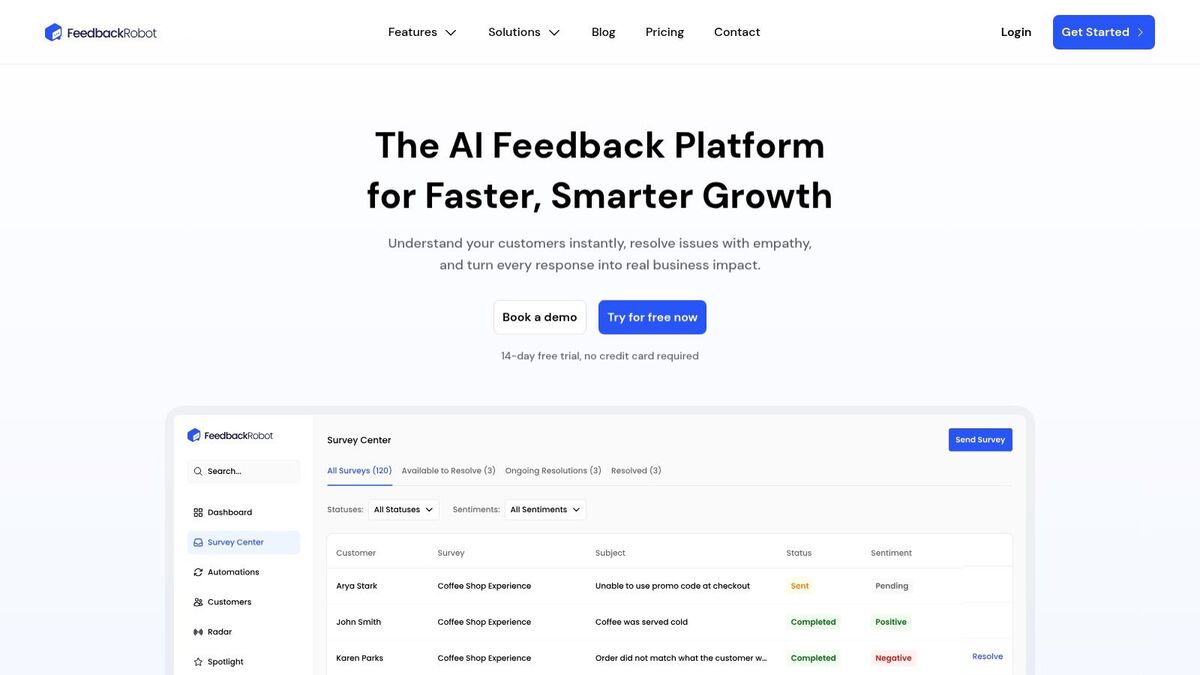
The platform’s power comes from its AI-driven core features. You can generate ready-to-send surveys using its Prompt to Survey function, which crafts effective questions from a simple command (e.g., "create a post-checkout survey for my hotel"). This is a massive time-saver for busy owners. To see how quickly you can create and deploy surveys, check out our free AI survey generator.
Key Features and Use Cases
What truly makes FeedbackRobot one of the best customer satisfaction survey tools for a small business is its cohesive, action-oriented workflow.
Radar (Unified Review Intelligence): This feature is your mission control. It centralizes feedback from every channel—surveys, QR codes, and public review sites like Google and TripAdvisor—into one dashboard. It gives you a single source of truth for understanding cross-platform trends without manually compiling data.
AI Summaries (Instant Insights & Sentiment Analysis): As feedback arrives, the AI instantly analyzes sentiment and identifies key themes. It provides you with immediate, digestible insights, so you know exactly what customers are praising ("friendly staff," "clean rooms") or complaining about ("slow service") without reading every single comment.
Resolutions Engine (Automated Service Recovery): This is where you act faster. This standout function lets you configure rules to automatically respond to feedback. For a negative review, the system can draft an empathetic reply, issue a discount code, and create a task for your manager to follow up, turning a poor experience into a recovery opportunity while you focus on other tasks.
Spotlight: Feedback Wall: Amplify your wins by turning your best reviews into social proof. This new feature allows you to stream your best feedback directly onto your website, building trust and driving more direct bookings.
Best Fit For: Hospitality (hotels, travel), Restaurants & F&B, Retail & E-commerce, Healthcare & Wellness, and Professional Services. It excels in environments where quick service recovery, managing online reputation, and direct integrations with systems like Mews or Toast are critical.
Pricing and Implementation
FeedbackRobot offers scalable pricing suitable for businesses at different growth stages.
Plan | Key Features |
|---|---|
Starter | 500 sends/150 responses, great for testing. |
Growth | 10,000 sends/3,000 responses, team inbox. |
Scale | Unlimited usage, automations, API access. |
Annual billing provides a 15% discount. A 14-day free trial (no credit card required) makes it easy to test the platform’s impact.
Pros and Cons
Pros:
AI-driven workflow from survey creation to automated resolution.
Centralized inbox (Radar) consolidates all feedback and shortens response times.
Actionable insights (AI Summaries) and automated service recovery (Resolutions Engine).
Deep integrations with key hospitality platforms like Toast and Mews.
Cons:
Core automation features (Resolutions Engine, API) are on the highest-tier plan.
Businesses in regulated industries like healthcare must verify compliance (e.g., HIPAA), as it's not explicitly stated.
Final Recommendation
FeedbackRobot is the best choice for service-focused small businesses that want to make feedback an active part of their daily operations. If your goal is to reduce churn, improve response times, and turn customer sentiment into a growth engine, this platform delivers the tools to make it happen.
Visit FeedbackRobot and start your free trial to see how our Feedback Operating System can work for you.
2. SurveyMonkey
SurveyMonkey is one of the most recognizable names in online surveys, and for good reason. It has evolved from a simple polling tool into a powerful platform, making it a contender for the best customer satisfaction survey tool for a small business, especially for those who need a tool that can grow with them. It provides a familiar, user-friendly interface that allows you to launch your first Customer Satisfaction (CSAT) or Net Promoter Score (NPS) survey in minutes.
The platform’s real strength lies in its scalability. A small cafe can start with a free plan to gather feedback via a simple QR code, while a growing professional services firm can upgrade to access advanced logic, AI-powered analysis, and integrations with Salesforce or HubSpot. This makes it an excellent all-rounder.
Key Features for Small Business Owners
AI-Powered Insights: "Genius" features help build surveys and automatically analyze open-ended text responses for sentiment and key themes.
Flexible Distribution: Share surveys via web link, email, social media, or embed them directly on your website.
Extensive Integrations: With over 200 integrations, you can connect feedback data directly into your existing CRM, email marketing, or team collaboration tools like Slack.
Advanced Logic: Use skip logic and answer piping to create a more personalized and relevant survey experience for customers.
Best For:
Retail/E-commerce: Use post-purchase surveys to measure satisfaction with product and delivery.
Professional Services: Gather client feedback after project completion to build case studies — our client satisfaction survey question bank gives you 25 ready-made questions to load into it.
Hospitality: A good starting point for hotels or restaurants wanting to move beyond basic reviews.
Pricing
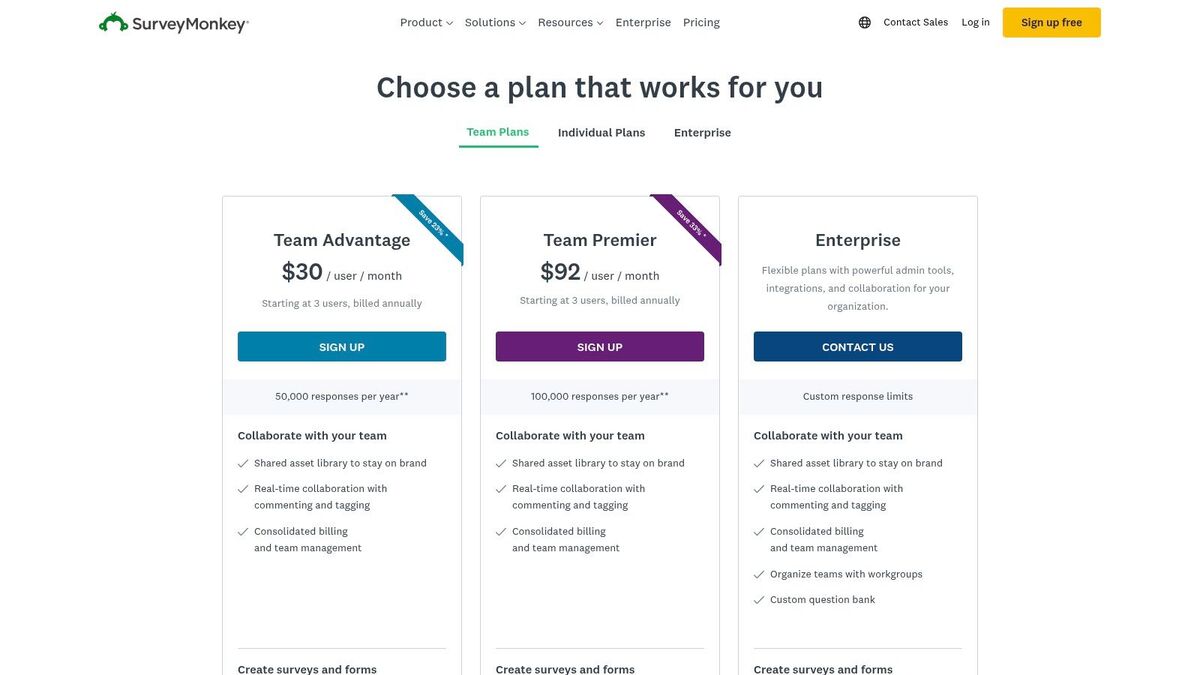
SurveyMonkey offers a limited free Basic plan. Paid plans, which unlock more features and remove response limits, start with the Standard Monthly plan at $99/month. The Advantage and Premier annual plans offer more advanced logic and data analysis features, which can become costly. The plan structure can be complex, so review the feature breakdown carefully to avoid paying for more than you need.
Pros & Cons
Pros:
Extremely user-friendly with a huge library of templates.
Scales well from very basic surveys to complex CX programs.
Strong analytics and reporting, including AI-driven text analysis.
Cons:
Advanced features are locked behind expensive higher-tier plans.
The free plan is quite restrictive on response numbers.
Lacks the automated actionability of a true Feedback Operating System.
Implementation Tips & Final Recommendation
Start with a clear goal, like measuring post-service satisfaction. Use one of SurveyMonkey's pre-built CSAT templates and customize it with your branding. Remember that the quality of your feedback depends on the questions you ask; learn how to write effective survey questions to ensure you get actionable data. For a small business testing the waters of formal feedback collection, SurveyMonkey is a solid, reliable choice with plenty of room to grow.
Website: https://www.surveymonkey.com/pricing/
3. Typeform
Typeform stands out by turning standard surveys into engaging, conversational experiences. Its one-question-at-a-time format feels more like a chat than a form, which can significantly boost completion rates. This approach makes it a strong choice for the best customer satisfaction survey tool, particularly for brands that want to project a modern, polished, and human-centric image in every customer interaction.
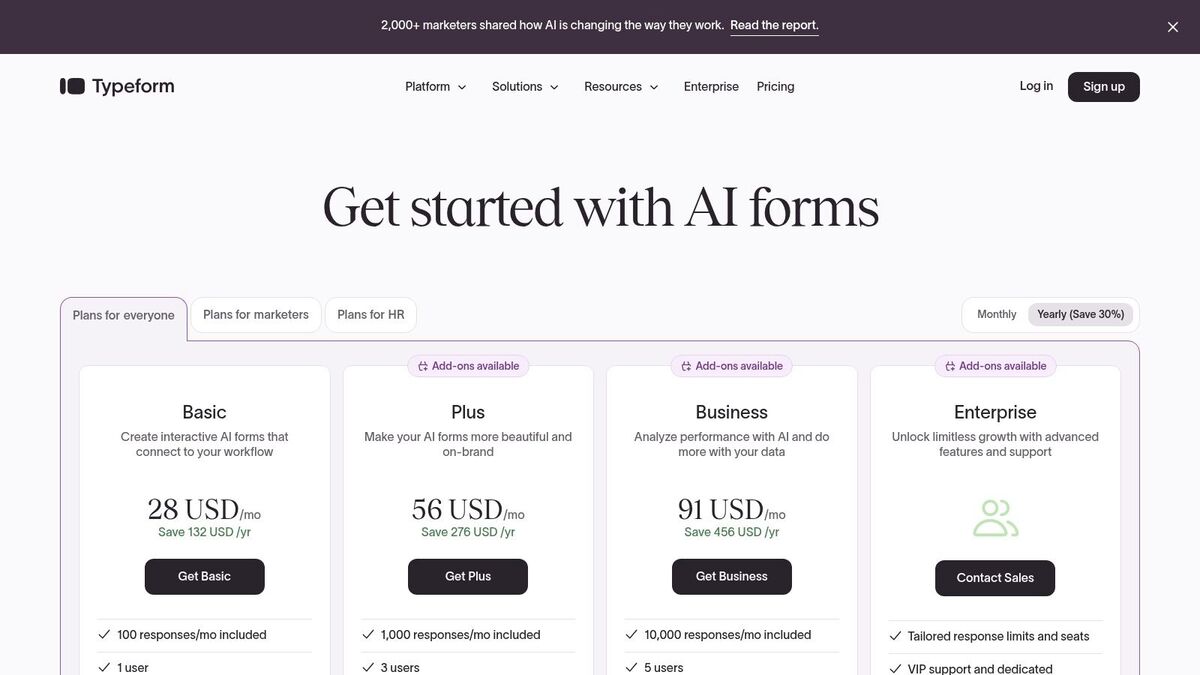
The platform excels at creating a beautiful and intuitive respondent journey on any device. For a small business, this focus on user experience is not just a cosmetic upgrade; it directly impacts the quality and quantity of feedback you receive. A customer who enjoys giving feedback is more likely to provide thoughtful answers.
Key Features for Small Business Owners
Conversational Interface: Presents one question at a time to keep respondents focused and reduce survey fatigue.
Logic Jumps: Create dynamic, personalized paths that show relevant questions based on previous answers, making the survey smarter.
Rich Media Integration: Embed images, GIFs, and video questions to make your surveys more visually appealing and interactive.
Templates & Ecosystem: A strong library of templates for CSAT, NPS, and post-purchase feedback helps you get started quickly.
Best For:
Retail/E-commerce: Ideal for post-purchase feedback surveys that feel on-brand and modern.
Professional Services: Gathering initial client intake information or post-project testimonials in an engaging way.
Hospitality: A great fit for collecting feedback on guest experiences via a stylish, mobile-friendly link.
Pricing
Typeform offers a free plan with up to 10 responses per month. Paid plans start with the Basic plan at $29/month, offering 100 responses. The Plus plan at $59/month increases this to 1,000 responses and adds branding removal. The Business plan at $99/month provides 10,000 responses and conversion tracking. Response quotas are a key factor, so you must choose a plan that matches your expected volume.
Pros & Cons
Pros:
Exceptional, mobile-first respondent experience that improves completion rates.
Highly customizable design to match your brand's aesthetic.
Predictable pricing tiers with clear response limits.
Cons:
Strict response limits per plan can force upgrades as your business grows.
Advanced analytics and reporting are less robust than on specialized CX platforms.
Can be more expensive than other tools if you have high survey volume.
Implementation Tips & Final Recommendation
Start by using a template for a simple CSAT survey and customize the design with your brand’s colors and logo. Embed the survey in your post-purchase email or on a thank-you page. Once you collect responses, you'll need a solid process to properly analyze your survey data to find actionable insights. For businesses that prioritize brand image and a smooth customer experience above all else, Typeform is a fantastic choice that makes feedback collection feel less like a chore and more like a conversation.
Website: https://www.typeform.com/pricing
4. Jotform
Jotform is more than just a survey tool; it's a versatile form builder that happens to be excellent at collecting customer feedback. This makes it a great choice if you need a single platform for surveys, order forms, appointment bookings, and more. Its power lies in combining data collection with action, allowing you to create a CSAT form that also processes a payment or adds a customer directly to your CRM.
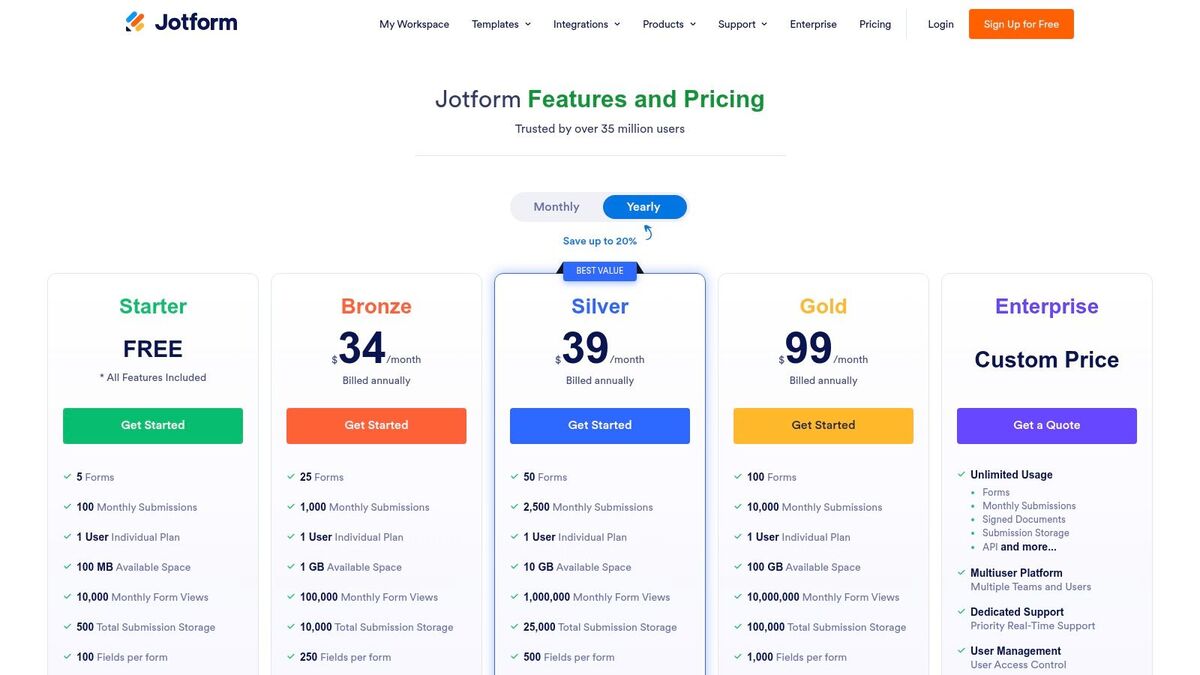
This all-in-one approach is ideal for a small business looking to consolidate software. Instead of paying for a separate survey tool and a separate payment form builder, Jotform handles both. Its huge template library means you can get started immediately without building from scratch.
Key Features for Small Business Owners
100+ Integrations: Connect your forms to tools you already use, including CRMs, email marketing platforms (like Mailchimp), and payment processors (like Stripe and PayPal).
Report Builder & Tables: Visualize survey data with automatically generated reports, charts, and spreadsheets directly within the Jotform interface for quick analysis.
HIPAA Compliance: For healthcare and wellness providers, higher-tier plans offer features to help maintain HIPAA compliance when collecting patient feedback.
Conditional Logic & Automation: Create smart forms that show or hide fields based on user answers and automate workflows, such as sending a notification to a manager after a negative review is received.
Best For:
Healthcare/Wellness: Excellent for collecting patient intake forms and post-appointment feedback while adhering to compliance needs.
Professional Services: Ideal for client onboarding forms that also include an initial satisfaction survey.
Nonprofits: Generous discounts make it a cost-effective tool for donor feedback and event registration forms.
Pricing
Jotform offers a generous free plan with most features but is limited to 5 forms and 100 monthly submissions. Paid plans like Bronze ($39/month) and Silver ($49/month) increase these limits and remove Jotform branding. The Gold plan offers HIPAA compliance features. Significant discounts are available for annual plans and for nonprofit or educational institutions.
Pros & Cons
Pros:
Great value if you need robust form-building capabilities beyond just surveys.
Huge template library and easy-to-use automation features.
Strong integration options, especially for payment processing.
Cons:
Free and lower-tier plans have strict submission and form limits.
Can be less focused on deep CX analytics compared to specialized platforms.
Advanced branding removal is only available on paid tiers.
Implementation Tips & Final Recommendation
Identify a process you can streamline. For example, create a single form for post-service feedback that also allows clients to book their next appointment. Use the conditional logic to only show the booking fields if they rate their satisfaction highly. While Jotform is a powerful builder, a dedicated Feedback Operating System can provide deeper insights. For instance, FeedbackRobot’s AI Summaries could analyze all your open-ended Jotform responses in one click, giving you instant sentiment and theme analysis that Jotform's reporting alone cannot.
Website: https://www.jotform.com/pricing/
5. Survicate
Survicate specializes in getting feedback at the right moment, making it a powerful choice if your goal is to target users directly within your website, app, or email flow. It moves beyond generic links by allowing you to trigger surveys like CSAT, NPS, or CES based on specific user actions or attributes, providing highly contextual insights.
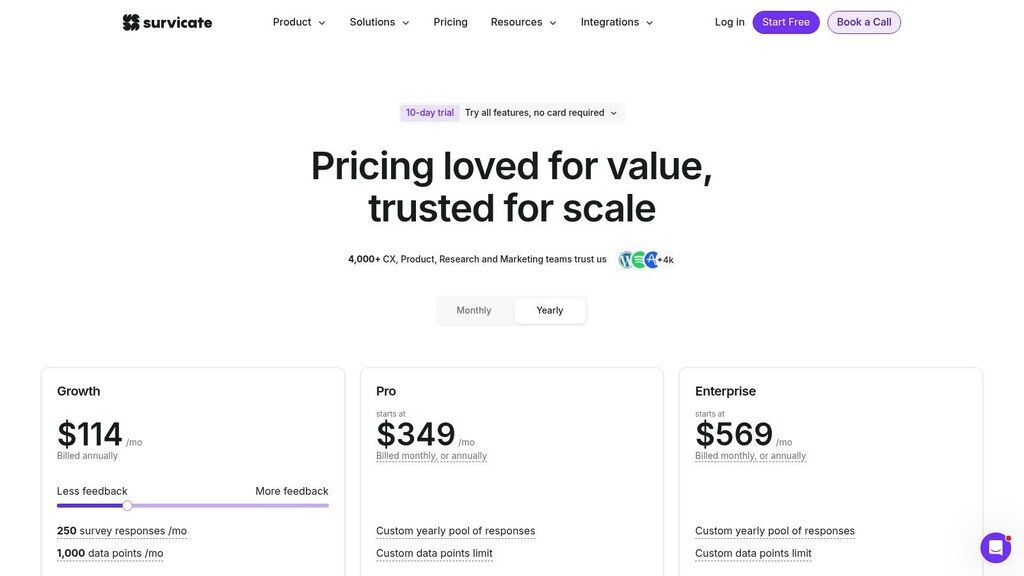
Its focus on multichannel deployment means you can capture feedback wherever your customers are. A SaaS business can embed a survey in-app after a user tries a new feature, while an e-commerce store can send a targeted email survey a week after delivery to measure product satisfaction. This approach helps increase response rates by making participation effortless.
Key Features for Small Business Owners
Multichannel Surveys: Run surveys via targeted website pop-ups, in-app widgets, email, and shareable links from one platform.
Advanced Targeting: Trigger surveys based on customer attributes, website events, or traffic sources for more relevant feedback.
Insights Hub: A central dashboard to analyze all feedback, with AI features to help identify trends in open-ended responses.
Native Integrations: Connects with over 25 tools, including HubSpot, Intercom, and Slack, to feed data into your existing workflows.
Best For:
SaaS/Tech: Gather in-app feedback on feature usage and user onboarding.
E-commerce: Deploy post-purchase surveys on-site or via email to understand the buying experience.
Digital Agencies: Collect client feedback at key project milestones directly through email.
Pricing
Survicate offers a free plan with 25 responses per month. Paid plans are response-based, starting at $99/month for 250 responses and including all core business features. This transparent model is great for small businesses that want to avoid complex feature-gated tiers. A 10-day free trial of a paid plan is available.
Pros & Cons
Pros:
Transparent, response-based pricing is easy to understand.
Excellent for targeted in-app and on-site surveys.
Easy to set up and deploy without technical expertise.
Cons:
The 10-day trial period is relatively short.
Some advanced reporting dashboards and integrations are reserved for higher-volume plans.
Less focused on broad market research than all-in-one platforms.
Implementation Tips & Final Recommendation
Identify one key customer touchpoint to start with, such as the "order confirmation" page on your e-commerce site. Use Survicate’s targeting rules to show a simple one-question CSAT survey to customers there. This focused approach provides immediate, actionable feedback without overwhelming your audience. For businesses that live online, Survicate offers a powerful and direct way to hear the customer's voice right where it matters most.
Website: https://survicate.com/pricing/
6. Zoho Survey
For small businesses already invested in the Zoho ecosystem, Zoho Survey presents a compelling and budget-friendly option. It stands out by offering a powerful set of features at a competitive price point, making it a great choice if seamless integration with other business software is a priority. It's designed to work hand-in-glove with other Zoho apps like CRM and Analytics, creating a unified data environment.
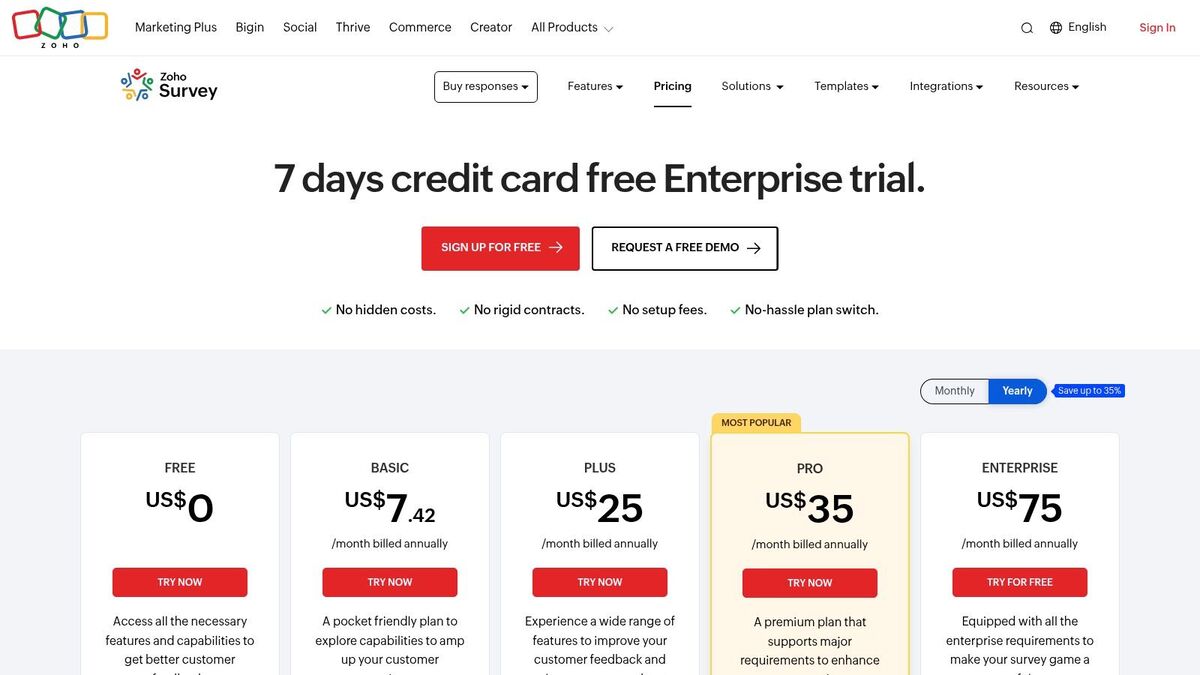
This tight integration is its main advantage. If you manage customer relationships in Zoho CRM, you can trigger a satisfaction survey automatically after a support ticket is closed. The results then flow directly back into the customer's record, giving your team a complete picture without needing complex third-party connectors.
Key Features for Small Business Owners
Deep Zoho Ecosystem Integration: Natively connects with Zoho CRM, Zoho Analytics, and Zoho Campaigns for a cohesive workflow.
Logic & Piping: Use skip logic, display logic, and answer piping to create dynamic and personalized surveys that feel more conversational.
Multilingual Support: Easily create and distribute surveys in multiple languages from a single platform, ideal for businesses with a diverse customer base.
Real-Time Reporting: Get instant reports and create custom dashboards to visualize trends as responses come in.
Best For:
Professional Services: Firms using Zoho CRM can automate feedback collection post-project.
SaaS/Tech Startups: A great fit for companies building their tech stack around Zoho products.
Education & Non-profits: The generous features on lower-tier plans provide significant value.
Pricing
Zoho Survey offers a limited free plan. The paid Plus plan is competitively priced at $29/month (billed annually) and unlocks unlimited questions and advanced logic. The Pro plan adds more features like multilingual surveys. Pricing can be dynamic, so it's wise to verify the final cost at checkout.
Pros & Cons
Pros:
Excellent value for money, with many features on affordable plans.
Seamless integration with the broader Zoho software suite.
Strong reporting capabilities, especially when connected to Zoho Analytics.
Cons:
The user interface can feel less modern than some competitors.
Third-party integrations outside the Zoho ecosystem are less extensive.
Less ideal if your business doesn't use other Zoho products.
Implementation Tips & Final Recommendation
If you're a Zoho user, this tool is a natural fit. Start by identifying a key customer touchpoint managed in your Zoho CRM, like a sales follow-up or a completed service call. Set up an automated survey trigger for that event. To get the most from your data, consider channeling it into a tool like FeedbackRobot, where our AI Summaries can instantly analyze sentiment and our Resolutions Engine can automate service recovery, adding a powerful layer of actionability to your Zoho feedback.
Website: https://www.zoho.com/survey/pricing.html
7. SurveySparrow
SurveySparrow brings a conversational, chat-like feel to feedback collection, which can significantly boost response rates. Its modern, mobile-first interface makes taking a survey feel less like a chore and more like a quick chat. This approach is perfect for engaging customers who are often on the go and makes it a strong contender for your small business.
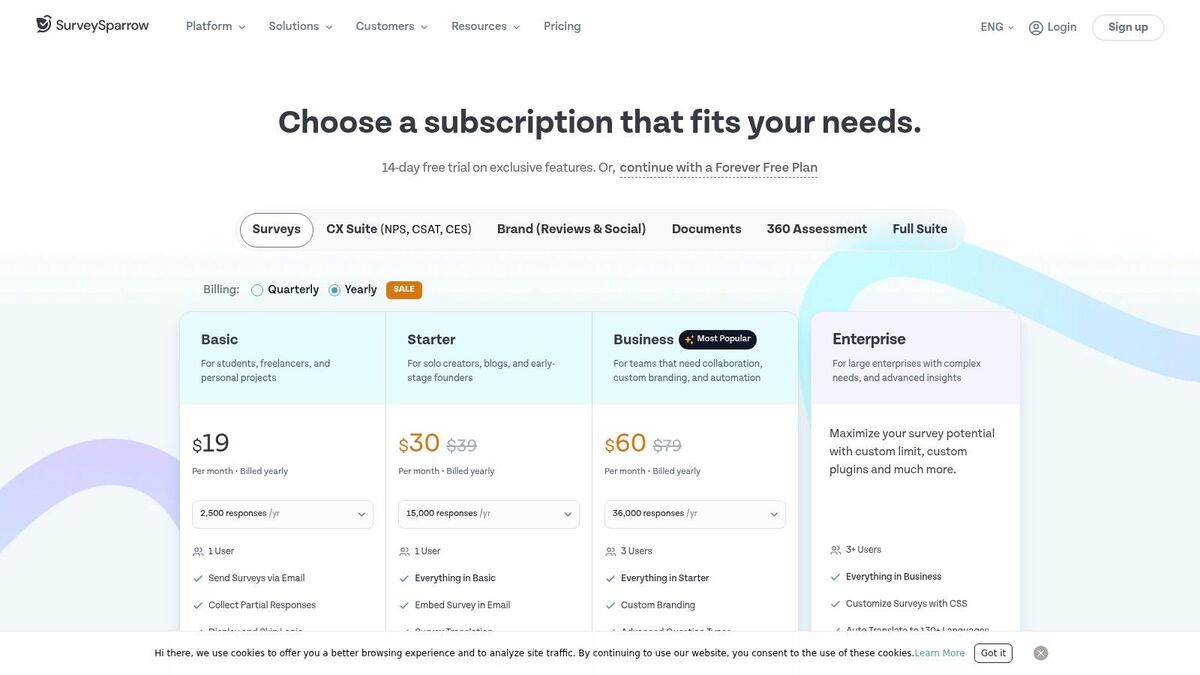
The platform is designed for businesses that want to automate their feedback loops without a steep learning curve. Setting up recurring CSAT or NPS surveys is straightforward, allowing you to consistently monitor customer sentiment over time. It strikes a good balance between powerful features and ease of use, offering value for growing teams.
Key Features for Small Business Owners
Conversational Interface: Creates engaging, chat-like surveys that improve completion rates on mobile and desktop.
Recurring Surveys: Automate the process of sending NPS, CSAT, or CES surveys at regular intervals to track satisfaction trends.
Workflow Automation: Higher-tier plans include webhooks and workflows to trigger actions in other apps based on survey responses.
Multi-Language Support: Easily translate your surveys to gather feedback from a global customer base.
Best For:
Retail/E-commerce: Engaging customers with post-purchase surveys that feel interactive.
Hospitality: A great fit for collecting quick feedback from guests via mobile.
Professional Services: Good for recurring client check-ins to monitor project satisfaction.
Pricing
SurveySparrow offers a free plan with limited features. Paid plans provide more flexibility, starting with the Basic plan at $39/month. The Business plan, required for more advanced automation, is priced competitively. Note that pricing figures can be dynamic, so check the site directly. They also offer discounts for startups and NGOs.
Pros & Cons
Pros:
Highly engaging, conversational survey format.
Easy to set up recurring CSAT and NPS campaigns.
Good value with tiered packages that scale with your needs.
Cons:
Key automation features are gated behind more expensive plans.
The interface, while modern, might not be ideal for very formal or traditional surveys.
Lacks a unified view of feedback from external review sites.
Implementation Tips & Final Recommendation
For a service business, start by using the free trial to build a conversational post-service CSAT survey. The friendly UI makes it easy to add your branding. If you want to connect this feedback with reviews from multiple sites, a tool with a unified dashboard like FeedbackRobot’s Radar feature is a great next step. SurveySparrow is an excellent choice for businesses looking to make their feedback process more modern and engaging, especially if they plan to scale their CX efforts over time.
Website: https://surveysparrow.com/pricing/
8. Nicereply
Nicereply is purpose-built for service-focused small businesses, centering its entire approach on capturing feedback directly within your customer support workflows. Unlike broader survey platforms, it excels at measuring satisfaction at key touchpoints, like right after a support ticket is resolved. This makes it a great choice if your primary goal is to improve service quality.
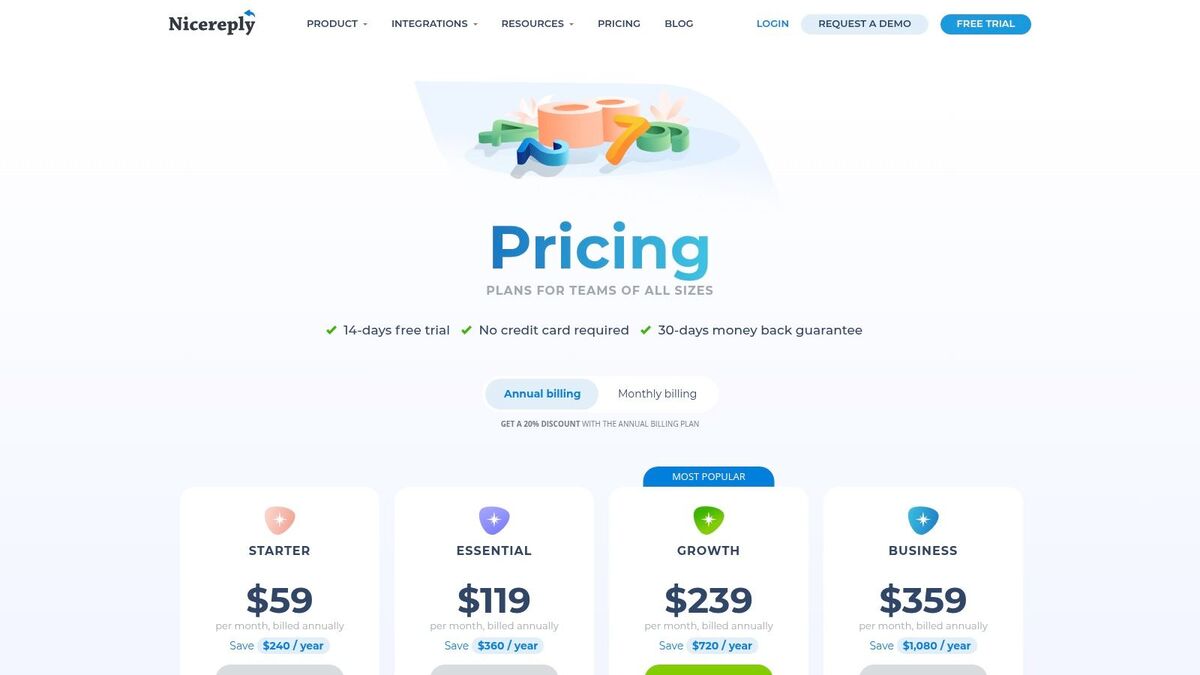
The platform is designed for rapid deployment. You can insert a one-click CSAT, NPS, or CES (Customer Effort Score) survey directly into your support agent’s email signature or have it trigger automatically after a case is closed. This tight integration with help desk software is its main differentiator, giving you immediate, contextual feedback on agent performance and customer happiness.
Key Features for Small Business Owners
In-Signature & Post-Resolution Surveys: Capture feedback with one-click surveys embedded in emails or sent automatically when a support ticket closes.
Deep Help Desk Integrations: Connects seamlessly with popular tools like Zendesk, Help Scout, Front, and Pipedrive to tie feedback directly to specific interactions.
Multiple Survey Types: Supports the core CX metrics: CSAT, NPS, and CES, allowing you to measure different aspects of the customer journey.
Unlimited Surveys: All paid plans allow you to run as many active surveys as you need, so you can test different questions and triggers without limitation.
Best For:
Professional Services: Firms using a help desk like Zendesk to manage client requests.
Retail/E-commerce: Ideal for getting feedback on the performance of your customer support team.
SaaS/Tech Support: Measure satisfaction and effort immediately after solving technical issues.
Pricing
Nicereply offers a 14-day free trial. Paid plans are based on response volume, starting with the Mini plan at $39/month for 100 responses. The Starter plan ($79/month for 400 responses) and Growth plan ($159/month for 1000 responses) offer more capacity. While the plans are transparent, a sudden spike in support volume could push you into a higher-cost tier unexpectedly.
Pros & Cons
Pros:
Extremely fast to set up within existing support workflows.
Deep integrations provide valuable, contextual feedback on agent performance.
Clear, response-based pricing with a money-back guarantee.
Cons:
Highly focused on support-centric feedback, not ideal for general market research.
Response caps on each plan can become costly for high-volume teams.
Fewer customization options compared to general-purpose survey builders.
Implementation Tips & Final Recommendation
Integrate Nicereply with your help desk from day one; this is its core strength. Start by adding a simple CSAT survey to your "ticket closed" notifications to establish a performance baseline. This tool is perfect for businesses where customer service is a key differentiator. If you need a simple, effective way to measure and improve your support team’s performance without the complexity of an all-in-one platform, Nicereply is an excellent choice.
Website: https://www.nicereply.com/pricing?utm_source=openai
9. AskNicely
AskNicely positions itself as a customer experience coaching platform. It is a powerful tool for service-based businesses with frontline teams, like a multi-location retailer or a home services company. The platform is built around operationalizing NPS feedback to drive immediate action and employee coaching, not just collecting data for a report.
Its core idea is to connect feedback directly to the frontline employee who delivered the service. This creates a powerful, real-time loop where positive recognition reinforces great behavior and constructive feedback triggers coaching opportunities. This makes it a great choice for businesses focused on consistent service quality across multiple locations or teams.
Key Features for Small Business Owners
Frontline Coaching Focus: Automatically routes feedback to the right manager and team member, with workflows for recognition and coaching.
Multi-Location Management: Provides roll-up reporting and leaderboards to compare performance across different branches, teams, or locations.
Conversational Surveys: Deploys simple, one-question NPS, CSAT, or 5-Star surveys via email and SMS for high response rates.
Operational Integrations: Connects with CRMs and helpdesks like Front to trigger surveys based on customer interactions and close the loop.
Best For:
Home Services (e.g., HVAC, Plumbing): Tie feedback directly to the technician who completed the job.
Fitness Studios/Gyms: Get feedback on individual trainers or class experiences.
Franchises & Multi-Location Retail: Maintain service consistency and identify top-performing branches.
Pricing
AskNicely does not list pricing publicly. Access is provided through a sales-led process where they build a custom quote based on your business size, number of locations, and required features. This means it is generally more expensive than self-serve tools and may be a significant investment for a very small business.
Pros & Cons
Pros:
Excellent for operationalizing feedback and driving team performance.
Strong focus on coaching and action, not just passive data collection.
Simple, high-response-rate survey design.
Cons:
Opaque, quote-based pricing can be a barrier for small businesses.
May be overly complex if you only need a simple, occasional survey tool.
Less focused on deep market research and more on service operations.
Implementation Tips & Final Recommendation
Before engaging with their sales team, have a clear picture of how you want to connect feedback to specific service interactions and employee actions. For this platform to be effective, you must commit to using the feedback for active coaching. If your goal is to empower your frontline teams and make customer feedback a daily operational metric, AskNicely is a purpose-built solution. For simple data collection, lighter tools may be a better fit.
Website: https://www.asknicely.com/
10. Birdeye
Birdeye goes beyond just surveys; it’s an all-in-one reputation and customer experience platform designed for local businesses. This makes it a great option if your primary goal is to turn customer feedback directly into public reviews and improved local search rankings. It tightly integrates CSAT and NPS surveys with a powerful review generation and online presence management engine.
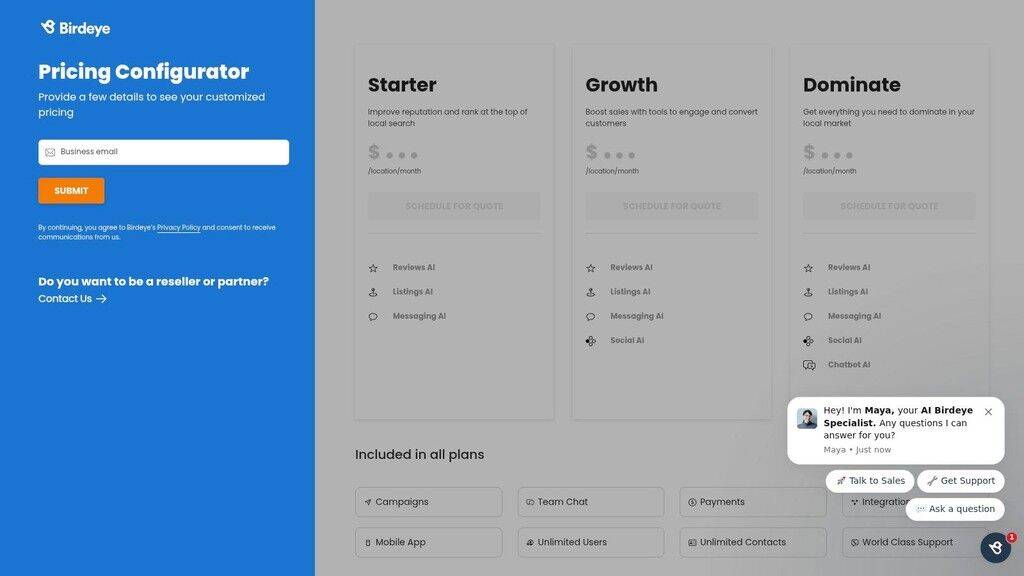
The platform is built for businesses where a strong local reputation drives revenue, like multi-location clinics, home services, or hospitality groups. By combining surveys with review monitoring, business listings, webchat, and mass texting, it centralizes customer communication and marketing efforts, allowing you to manage your online reputation from a single dashboard.
Key Features for Small Business Owners
Integrated Survey & Review Requests: Automatically send survey requests via SMS or email after a service, and then prompt satisfied customers to leave a public review on Google or other sites.
Unified Messaging Inbox: Manage communications from webchat, text messages, and social media in one place for a consistent customer experience.
Listings & Reputation Management: Monitor and manage your business listings and reviews across hundreds of sites to ensure accuracy and respond quickly.
Campaign & Referral Tools: Launch text marketing campaigns and build referral programs to drive repeat business and new customer acquisition.
Best For:
Home Services/Trades: Excellent for plumbers or electricians looking to boost local SEO with reviews.
Healthcare Clinics: Ideal for dental or medical offices managing patient feedback and online appointments.
Multi-Location Retail/Hospitality: Centralizes reputation management for businesses with several physical locations.
Pricing
Birdeye uses a custom quote-based model, so you won't find pricing on its website. Plans are bundled based on the features you need, and contracts are typically annual. This approach can be more expensive than single-purpose survey tools, so it’s best suited for businesses ready to invest in a comprehensive reputation management solution.
Pros & Cons
Pros:
A powerful, unified platform for surveys, reviews, and messaging.
Excellent for driving local SEO and generating public reviews.
Strong mobile app for managing customer interactions on the go.
Cons:
Pricing is not transparent and often requires a long-term contract.
May be too complex and costly if you only need a simple survey tool.
The primary focus is reputation, not deep-dive survey analytics.
Implementation Tips & Final Recommendation
Define your main objective. If it's to get more Google reviews, configure Birdeye to automatically text a short survey post-appointment and direct happy responders to your Google Business Profile. Because it’s a broader suite, ensure you train your team on using the unified inbox to maintain a consistent brand voice. For a local service business whose lifeblood is its online reputation, Birdeye is a powerful engine for growth.
Website: https://birdeye.com/pricing/
11. Qualaroo
Qualaroo specializes in capturing in-the-moment feedback directly on your website or within your app. Instead of traditional email surveys, it uses subtle on-site "Nudges" to ask targeted questions at the perfect time, making it a powerful choice if your primary goal is understanding user behavior online. It’s perfect for diagnosing why customers abandon a shopping cart or for getting immediate CSAT feedback after a specific action.
The platform’s power comes from its advanced targeting. You can trigger a micro-survey based on user behavior (like time on page or exit-intent), identity, or even geolocation. This makes the feedback highly contextual and actionable, turning your website into a real-time listening post.
Key Features for Small Business Owners
Contextual "Nudges": Use pop-up, exit-intent, or link-based surveys to ask questions at critical points in the customer journey.
Advanced Targeting: Trigger surveys based on specific events, user traits, and location with mobile SDKs available for in-app feedback.
AI-Powered Sentiment Analysis: The tool integrates with IBM Watson to analyze open-ended responses, giving you a quick read on customer sentiment without manual sorting.
Key Integrations: Connect Qualaroo with Segment, Slack, HubSpot, and Salesforce to push feedback data directly into your existing workflows.
Best For:
E-commerce: Identify friction points in the checkout funnel with exit-intent surveys.
SaaS/Tech: Gather in-app feedback on new features or gauge user satisfaction without pulling them out of the application.
Professional Services: Ask for quick feedback on a "Contact Us" or "Thank You" page.
Pricing
Qualaroo's pricing starts with the Essentials plan at $69/month (billed annually) for one domain. The Premium plan at $149/month (billed annually) adds features like advanced targeting and exit-intent surveys. Full branding removal and advanced exports are reserved for the Business plan, starting at $299/month, which can be a significant jump for small businesses.
Pros & Cons
Pros:
Excellent for 'in-the-moment' contextual feedback on websites and apps.
Powerful targeting options allow for very specific feedback collection.
Easy to deploy and test different micro-surveys quickly.
Cons:
The survey editor can feel a bit rigid; it lacks simple drag-and-drop reordering.
Key features like CSV exports and removing branding are locked in higher-priced plans.
Less suited for long-form, relationship-based surveys.
Implementation Tips & Final Recommendation
Focus on a single, high-value goal, like understanding cart abandonment. Set up an exit-intent "Nudge" on your checkout page with one or two simple questions. Qualaroo excels at this kind of micro-feedback, but for a more unified view of your entire customer journey, you'll need a true Feedback Operating System. A platform like FeedbackRobot uses Radar to pull Qualaroo data alongside reviews and other feedback, giving you a complete picture.
Website: https://qualaroo.com/pricing
12. Refiner
Refiner is a highly specialized tool designed for digital-native businesses that need to deploy targeted micro-surveys directly within their website or mobile app. If your small business is a SaaS product or a sophisticated e-commerce store, Refiner is a great choice because it focuses on event-triggered feedback. It allows you to ask the right question at the perfect moment in the user journey.
This platform is built for product and marketing teams who are comfortable with a more technical setup. By using web/mobile SDKs, you can trigger NPS, CSAT, or CES surveys based on specific user actions, such as after a user completes a key feature for the first time or right after a checkout. This precision ensures feedback is highly contextual and actionable.
Key Features for Small Business Owners
Granular Targeting: Launch surveys based on user events, traits, and segment membership for hyper-relevant feedback.
Multi-Channel Deployment: Deliver surveys in-app (web & mobile), as website popups, or via traditional email and shareable links.
Deep Integrations: Connects seamlessly with product analytics stacks (Segment, Mixpanel, Amplitude) and data warehouses (BigQuery), as well as CRMs like HubSpot and Salesforce.
AI-Powered Analysis: Automatically tags and categorizes open-ended responses to identify trends without manual work.
Best For:
SaaS Companies: Measure Product-Market Fit (PMF) and user satisfaction at key points in the customer lifecycle.
E-commerce: Trigger post-purchase CSAT surveys directly on the confirmation page or in-app.
Tech-Savvy Businesses: Ideal for teams that want to integrate feedback data directly into their product analytics and development workflows.
Pricing
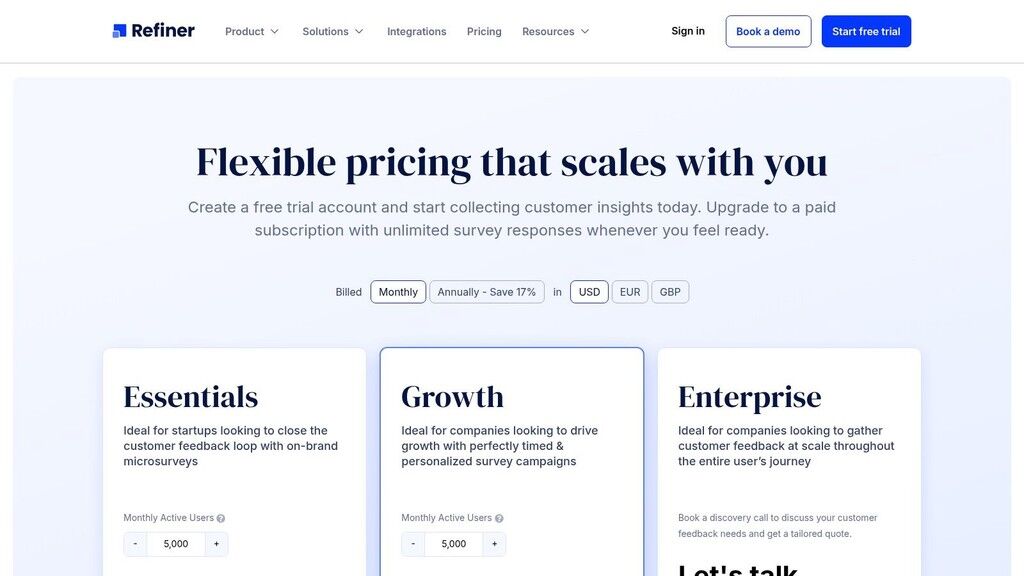
Refiner’s pricing is usage-based, tied to your Monthly Active Users (MAUs), and is not publicly listed; you must contact their sales team for a quote after a discovery call. While paid plans offer unlimited responses, the cost is tailored to your scale, which can be an advantage for small but growing startups.
Pros & Cons
Pros:
Excellent targeting capabilities for contextual in-app feedback.
Integrates deeply with developer and product analytics tools.
Unlimited survey responses on all paid tiers.
Cons:
Pricing is not transparent and requires a sales call.
Requires technical knowledge to implement SDKs and event-based triggers.
Less suited for non-digital businesses like traditional retail or hospitality.
Implementation Tips & Final Recommendation
To get started, identify one critical event in your user journey, like a customer successfully using a new feature. Configure Refiner to trigger a simple one-question CSAT survey at that moment. This developer-centric approach is powerful but requires a specific skill set. For businesses needing to unify feedback across multiple channels without technical setup, a tool like FeedbackRobot’s Radar offers a more accessible way to see all your reviews and survey data in one dashboard.
Website: https://refiner.io/pricing/
Top 12 Customer Satisfaction Survey Tools Comparison
Product | Core features | UX & Analytics | Pricing & value | Best fit / Target | Unique selling point |
|---|---|---|---|---|---|
FeedbackRobot | Prompt-to-survey AI, multichannel capture, team inbox, automations, API | Real-time sentiment & theme analysis; Radar dashboards; AI-crafted replies | Starter $39/mo; Growth $99/mo; Scale $299/mo; 14-day free trial | Hospitality, restaurants, retail, clinics, services | End-to-end AI workflows + automated resolutions and Spotlight review widgets — Recommended |
SurveyMonkey | AI builder, advanced logic, embeds, 200+ integrations | Familiar UI; enterprise dashboards; AI analysis | Tiered plans; advanced features on higher tiers | SMBs to enterprises needing broad survey use | Large template library and extensive integrations |
Typeform | Conversational forms, logic jumps, multi-language, templates | Polished mobile-first respondent experience | Clear tiers; quotas per plan; predictable pricing | Small teams focused on response rates and brand | High completion rates via conversational UX |
Jotform | Form builder, payments, CRM integrations, templates, HIPAA option | Flexible form/reporting tools; Tables & Report Builder | Value pricing; discounts for nonprofits/education; paid tiers for branding/HIPAA | Teams needing payments/files with surveys (nonprofits, education) | Payment integrations + HIPAA-capable plans |
Survicate | Multichannel surveys, targeting, Insights Hub, 25+ integrations | Easy web/app targeting; lightweight insights; growing AI | Response-based plans; 10-day trial | SMBs wanting multichannel CSAT/NPS without heavy complexity | Transparent response pricing and quick setup |
Zoho Survey | Skip/display logic, multilingual, webhooks, Zoho integrations | Simple builder; smooth handoff to Zoho Analytics | Budget-friendly tiers; unlimited surveys on paid plans | Businesses already in Zoho stack | Strong native integration with Zoho ecosystem |
SurveySparrow | Conversational surveys, recurring CSAT/NPS, workflows | Friendly UI; translation support; CX suite for dashboards | Free plan + tiered packages; trials and discounts | Growing teams needing recurring CSAT with translations | Conversational UI + tiered CX workflows |
Nicereply | CSAT/NPS/CES, in-signature & post-resolution delivery, helpdesk integrations | Support-centric analytics; fast deployment in workflows | Transparent plans; free trial; response caps per plan | Support/customer success teams | Deep help-desk integrations and signature/post-resolution surveys |
AskNicely | NPS automation, leaderboards, coaching workflows, SMS/email | Real-time feedback loops; team coaching focus | Sales-led pricing (quote) | Multi-location service businesses | Operationalizes NPS with coaching & frontline actions |
Birdeye | Surveys + review generation, listings, messaging, campaigns | Unified inbox and reputation dashboards; mobile app | Quote-based; suite pricing | Multi-location local businesses (clinics, hospitality, trades) | Combines surveys with review generation and local SEO tools |
Qualaroo | On-site & in-app micro-surveys, exit-intent, targeting, SDKs | Quick A/B testable nudges; AI sentiment/branching | Tiered plans; exports/branding on paid tiers | Product teams needing in-the-moment website/app feedback | Sophisticated behavior/geolocation targeting for micro-surveys |
Refiner | In-app/web SDKs, AI tagging, dashboards, product analytics integrations | Developer-friendly flows; segmentation & AI tagging; SOC 2 | MAU/usage-based; pricing via sales | SaaS and e‑commerce teams instrumenting product events | Product-led targeting with strong analytics stack integrations |
Final Thoughts
You’ve navigated the extensive list of the best customer satisfaction survey tools available for your small business, and now the real work begins: choosing the right partner to help you collect smarter, act faster, and grow stronger. The journey from simply gathering feedback to building a true guest-centric operation is significant, but it's the most reliable path to sustainable growth in hospitality, retail, and other service industries.
The tools we've explored, from SurveyMonkey's broad reach to Typeform's engaging interfaces and Birdeye's reputation management focus, all offer a way to ask, "How did we do?" However, the most critical question you should ask yourself is, "What will we do with the answers?"
From Data Collection to Actionable Intelligence
The core takeaway is this: a survey tool is just a starting point. True business impact comes from what happens after the customer clicks "submit." Your goal should not be to simply amass star ratings or NPS scores. The real objective is to integrate feedback directly into your operational DNA.
This means moving beyond basic data collection toward a complete Feedback Operating System. A system that can:
Unify all feedback sources: Pulling in reviews from Google and TripAdvisor alongside your direct surveys. This is the function of an intelligence feature like FeedbackRobot's Radar, which creates a single source of truth for your customer sentiment.
Analyze sentiment automatically: Instead of manually reading thousands of responses, a system should tell you what matters most. AI Summaries are critical here, instantly pinpointing themes, identifying emotions, and saving you dozens of hours.
Trigger immediate action: A negative review is a service recovery opportunity in disguise. A Resolutions Engine automates this process, turning a complaint into a tracked ticket and ensuring your team closes the loop, fast.
Making Your Final Decision
As you weigh your options, don't just compare feature lists. Consider the operational fit. If you run a busy hotel using Mews or a bustling restaurant on Toast, a tool that integrates seamlessly with your existing systems is not a luxury; it's a necessity. It’s what enables powerful workflows like the Prompt to Survey feature, which automatically sends a survey request the moment a guest checks out or pays their bill, guaranteeing high response rates and timely insights.
Remember, once you collect all this valuable customer feedback, effectively managing that data and the relationships it represents is crucial. To get the most out of your new insights, consider investing in one of the best CRM for small business options to organize and act on customer information.
The best tool for your small business will be the one that not only helps you listen but empowers your team to act. It should make service recovery easier, highlight your star employees, and give you the clear, direct intelligence you need to make smarter business decisions. Your customers are already telling you how to win their loyalty. It’s time to choose the tool that helps you hear them loud and clear.
Ready to turn feedback into your biggest growth driver? FeedbackRobot is more than just a survey tool; it's a complete Feedback Operating System designed for busy service businesses. Start your free trial today and see how our automated intelligence can help you collect smarter, act faster, and grow stronger. Or, be the first to check out our new Spotlight: Feedback Wall to see how you can turn your best reviews into your most powerful marketing asset.
How does an automated "Resolutions Engine" actually impact the bottom line in high-stakes environments like hotels or clinics?
In service-driven sectors, the speed of response is often more critical than the solution itself. A Resolutions Engine, like the one featured in FeedbackRobot, functions as a 24/7 service recovery specialist. By configuring automated rules—such as triggering an immediate empathetic apology and a discount code for a "low-star" rating—you "close the loop" before a disgruntled guest has the chance to post a public review. This proactive intervention transforms a potential churn event into a loyalty-building moment, significantly reducing the manual labor required by managers to monitor and respond to every individual piece of feedback.
With feedback arriving from Google, TripAdvisor, and direct surveys, how can a busy owner avoid "analysis paralysis"?
The key is shifting from manual data collection to unified intelligence. Tools utilizing features like "Radar" centralize fragmented data points into a single dashboard, providing a "source of truth" for your brand’s reputation. Instead of reading every single comment, professional-grade platforms now use AI Summaries to identify recurring themes—such as "slow check-in" or "excellent bedside manner." This allows you to focus your limited time on fixing systemic operational issues revealed by sentiment analysis rather than getting lost in the noise of individual reviews.
Why should a service brand prioritize a "conversational" survey interface over traditional multi-page forms?
High completion rates are the lifeblood of actionable data, and traditional forms often suffer from "survey fatigue." Conversational interfaces, pioneered by platforms like Typeform and SurveySparrow, present one question at a time to mimic a natural human interaction. This design choice reduces cognitive load and makes the experience feel less like an interrogation and more like a dialogue. For a hospitality brand, this polished, mobile-first approach ensures that guests are more likely to provide thoughtful, open-ended feedback while the experience is still fresh in their minds.
What is the strategic advantage of integrating a survey tool directly with systems like Toast or Mews?
Operational fit is what separates a simple "polling tool" from a "Feedback Operating System." When your survey platform is integrated with your Point of Sale (Toast) or Property Management System (Mews), you can automate "Prompt to Survey" triggers. This means a guest receives a feedback request the exact moment they settle their bill or check out. Capturing sentiment at these precise touchpoints ensures the highest possible response accuracy and allows for real-time performance tracking of specific staff members or shifts, which is invaluable for data-driven coaching.
How should a business decide between a reputation-focused tool like Birdeye and a product-centric tool like Refiner?
The decision hinges on your primary growth lever. If your business relies on local discovery and SEO—such as a dental clinic or a plumbing service—a reputation management platform like Birdeye is superior because it focuses on converting private feedback into public Google reviews. Conversely, if you operate a digital-first service or a SaaS platform, a tool like Refiner is better suited for your needs. Refiner uses technical SDKs to trigger "micro-surveys" based on specific user actions within an app, providing deep product-level insights that a general reputation tool simply cannot capture.
Put this on autopilot
Customer Satisfaction Survey
A ready-made FeedbackRobot automation that runs this for you — deploys free in under 5 minutes.
Stop reading about it. Let your agent handle it.
25 free AI actions · no credit card required
Start Free