

What it does
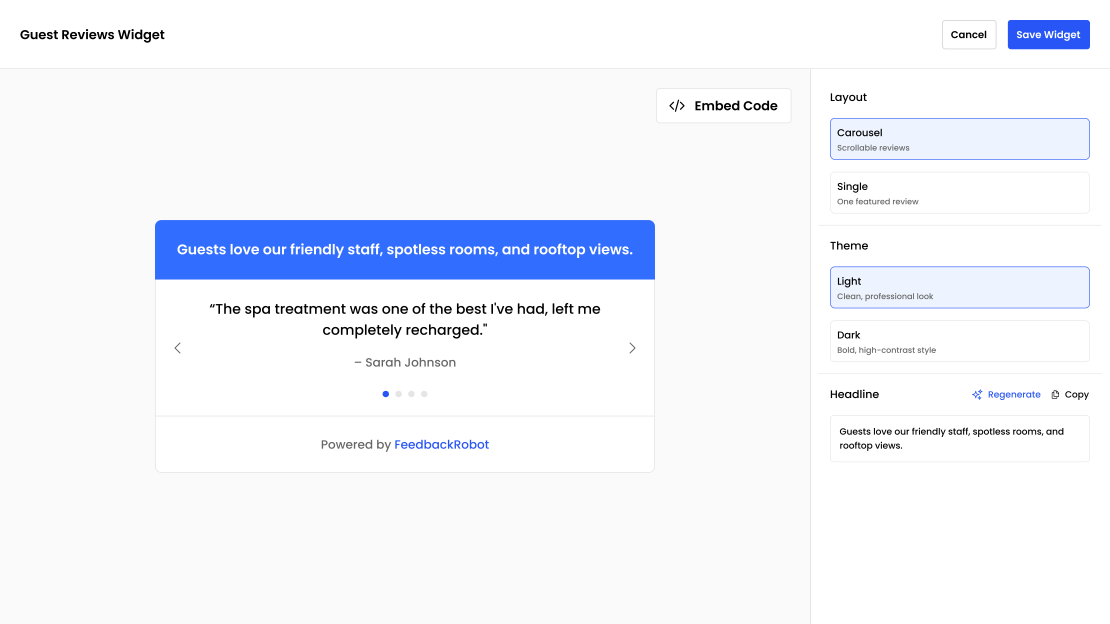
Embeddable review widgets
AI-designed carousels, grids, or single highlights for your site.
Social-ready posts
Branded visuals ready for Instagram, LinkedIn, and more.
Feedback wall
A hosted, branded page with its own shareable link — for bios, signatures and QR codes.
Customizable themes
Light, dark, or a fully custom color scheme to match your brand.
How it works
-
1
Select reviews from surveys or external review sites.
-
2
Create your highlight — AI blends copy, layout, and branding.
-
3
Publish and share via website embed or social post.
Inside the product
What it looks like in FeedbackRobot
Spotlight makes two different things
They get confused often enough to be worth separating.
Widgets are embedded into a page on your own site. Spotlight generates an HTML snippet you copy and paste — an iframe — which works on any platform that lets you insert custom HTML: Webflow, WordPress, Shopify, Squarespace, a hand-built site, anything. The reviews inside stay current without you touching the snippet again.
Feedback walls are hosted pages with their own shareable link. You don’t embed a feedback wall; you link to it. That makes it useful in the places an embed can’t go — an Instagram bio, an email signature, a QR code on a table tent, a line in a proposal.
Pick the widget when you want social proof inside an existing page. Pick the wall when you want a destination you can point at from anywhere.
Where the content comes from
Both pull from the feedback you already have: responses to your surveys, and reviews from any platform connected through Radar. You choose what qualifies — by rating, by source, or by picking individual pieces by hand.
Because it draws from live data, a widget you embed once keeps refreshing as new positive feedback arrives. You are not maintaining a testimonials page by hand any more.
Theming
Widgets and walls both take your brand colours, and ship with light and dark variants. If your site already has a defined palette, set it once in branding settings and everything Spotlight generates inherits it. The intent is that an embedded widget reads as part of your site rather than as an obvious third-party box.
A note on which reviews to show
The instinct is to show only five-star reviews. In practice a wall of nothing but perfect scores reads as filtered, and shoppers have learned to discount it. A spread that includes strong four-star reviews tends to be more persuasive than a uniform five-star wall, because it looks like what it is: real feedback from real customers. Spotlight lets you set the threshold, so this is your call rather than ours.
Frequently asked questions
What is Spotlight?
Spotlight helps you showcase your best customer feedback with beautiful widgets and ready-to-share social posts — all powered by AI.
What can I do with my best reviews in Spotlight?
You can turn them into AI-designed embeddable widgets (carousels, grids, or single highlights) for your site, or branded, social-ready posts for Instagram, LinkedIn, and more.
What's a Feedback Wall?
A Feedback Wall is a branded page that showcases your best 5-star reviews in one place.
Can I match Spotlight to my brand?
Yes — you can choose a light, dark, or fully custom color scheme to match your brand.
Can I try a wall of love before signing up?
Yes — three free tools cover the manual version: the Google Reviews Widget embeds your current reviews on any site, the Review-to-Social Image Generator turns single reviews into shareable graphics, and our wall of love guide shows how to combine them. Spotlight is what those grow into: a wall that collects, curates, and updates itself.
Setup takes 3 minutes. Your agent handles the rest.
Get Started — 25 Free AI Actions