

What it does
All reviews in one dashboard
Consolidate feedback from multiple review platforms in a single view.
AI sentiment analysis
Automated sentiment tagging across platforms.
AI review summaries
Quick AI-generated summaries to enable faster decision-making.
AI-drafted replies
A reply written in your tone of voice, ready for you to review and post.
How it works
-
1
Connect your review sources — link supported review platforms.
-
2
Radar fetches and analyzes every review, surfacing sentiment and trends.
-
3
Monitor reputation trends, assign reviews, and reply directly when supported.
Inside the product
What it looks like in FeedbackRobot
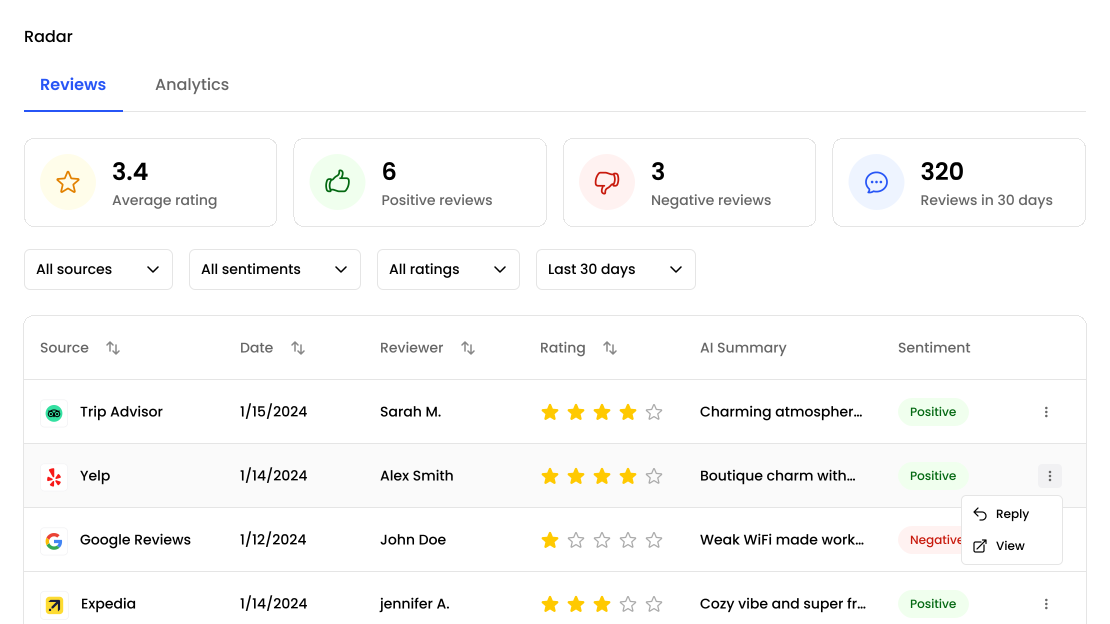
Which review sites Radar connects to
Radar pulls reviews from nine platforms: Google, Tripadvisor, Booking.com, Expedia, Agoda, Facebook, Yelp, Zomato and OpenTable. You connect each one once, from the skills marketplace, and Radar keeps it in sync from then on.
Google is the quickest to connect — you search for your business by name and pick it from the list. The other platforms are connected by pointing Radar at your existing listing, so there is no migration and nothing to install on your side. Connecting a source does not change anything about how that listing works publicly; Radar only reads from it.
What happens after a source is connected
The first sync pulls in your review history so you are not starting from an empty dashboard, then new reviews arrive automatically as they are posted. Every review that comes in is:
- Tagged for sentiment, so you can filter to the negative ones without reading everything
- Summarised, so a month of reviews can be read as a paragraph instead of a list
- Checked against your resolution rules, which is what allows a bad review to open a resolution automatically rather than sitting unnoticed
Reviews from every connected platform land in the same view. If you run several locations, each location keeps its own sources and its own numbers, and the roll-up view shows the group.
Replies are drafted, not posted
This is worth being precise about, because most tools in this category are vague on it. FeedbackRobot drafts a reply in your tone of voice and shows it to you. Publishing it is still your action, in the review platform’s own console.
That is a deliberate boundary rather than a missing feature. Most review platforms either don’t offer a reply API or restrict it in ways that make automated posting unreliable, and a reply posted to the wrong review is far more damaging than one posted a few minutes later. What you save is the writing, not the clicking — which is where the time actually goes when you are dealing with a week’s worth of reviews.
What Radar is for
Radar answers three questions that are genuinely hard to answer manually once you pass a few dozen reviews a month: what are people saying, is it getting better or worse, and which specific review needs a human today. Sentiment trends and keyword tracking cover the first two. The resolutions queue covers the third.
If you only need to watch a single Google listing, Radar is more than you need. It earns its place when you have more than one platform, more than one location, or enough review volume that reading everything stops being realistic.
Frequently asked questions
What is Radar?
Radar consolidates reviews from Google, Tripadvisor, Booking.com, Expedia, Agoda, Facebook, Yelp, Zomato and OpenTable into one dashboard, so you can track reputation and analyse sentiment without logging into each platform.
Which review platforms does Radar support?
Google, Tripadvisor, Booking.com, Expedia, Agoda, Facebook, Yelp, Zomato and OpenTable. All of them feed the same dashboard, and each is connected once from the skills marketplace.
Can I reply to reviews from Radar?
Radar drafts a reply in your tone of voice, ready for you to review. Publishing it is still your action, done in the review platform's own console — FeedbackRobot drafts replies rather than posting them.
Does Radar import my existing reviews?
Yes. The first sync pulls in your review history, so you start with your existing reviews and sentiment trends rather than an empty dashboard.
How does Radar analyse sentiment?
Radar tags sentiment automatically across every connected platform and generates AI summaries, so you can spot trends without reading every review individually. For how the underlying technology works, see our guide to automated sentiment analysis.
Setup takes 3 minutes. Your agent handles the rest.
Get Started — 25 Free AI Actions