

What it does
Unified inbox
See every piece of feedback — surveys, messages, reviews — in one place.
Rule-based escalation
Automations push specific cases into the queue, beyond the automatic sentiment thresholds.
Roles and permissions
Scope teammates to the locations and areas they actually need.
Real-time progress tracking
See what's been handled, what's pending, and by whom, across the team.
How it works
-
1
Centralize feedback from surveys, messages, and reviews.
-
2
Auto-assign tasks based on content routing.
-
3
Collaborate and respond directly within the inbox.
Inside the product
What it looks like in FeedbackRobot
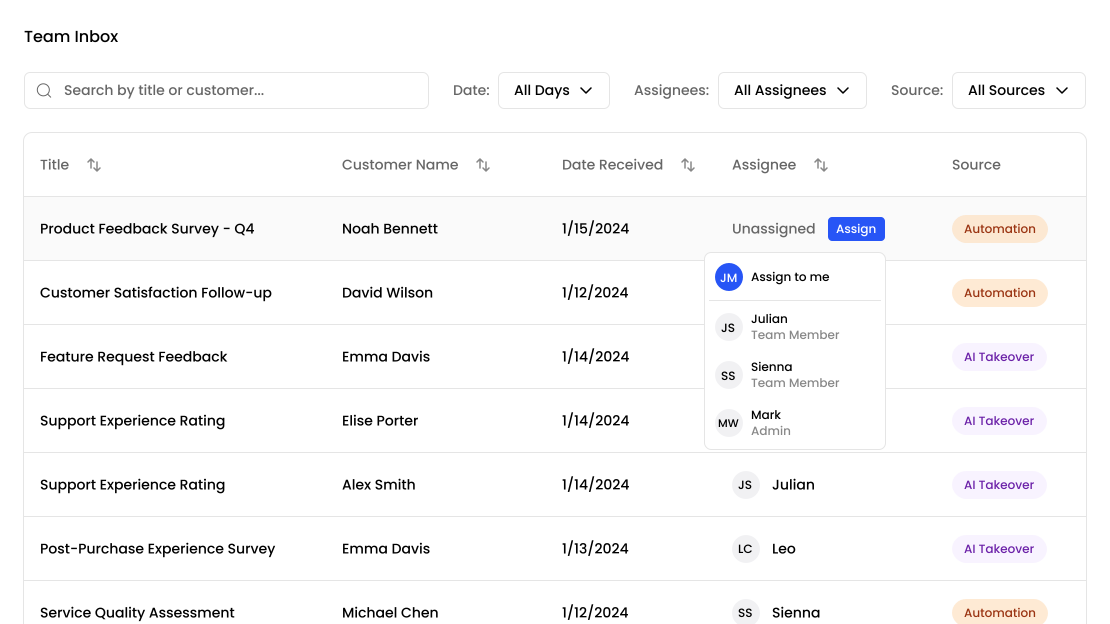
One queue, not four
Feedback arrives in more places than any one person watches. A survey response lands in one system, a Google review in another, a Booking.com review in a third. The team inbox is the single queue all of it flows into, so “has anyone dealt with this?” has one place to look rather than four.
Items in the queue are one of two kinds. Conversations come from survey responses, and you can reply to the customer directly from the thread. Reviews come from any platform connected through Radar, and are public. Filtering by kind separates the private replies you owe someone from the public ones everyone can see.
Work is tracked by state
Every item sits in Active, Ongoing or Resolved.
Active means nobody has touched it. Ongoing means a conversation is underway. Resolved means it’s closed. Anyone on the team can see all three at any time, which is what stops the two failure modes of a shared queue: the item nobody picked up, and the item two people answered separately.
This is state-based rather than per-person ownership — the queue tells you what stage something is at rather than assigning it to an individual. For most teams handling feedback, that’s the right granularity: the work is short-lived and the queue is shared, so a status is more useful than an owner.
Getting things into the queue
Most items arrive automatically, based on the thresholds you set — a review below a certain rating, a survey response that reads negatively.
For anything else, an automation can push items in with an escalate to team inbox step. That’s how you route by rule rather than by sentiment: everything from one location, everyone who answered a particular question a particular way, every customer above a certain value.
Who can see what
Team members are invited from settings, and roles control what each person can reach. A location manager can be scoped to their own location’s feedback; someone handling replies doesn’t need access to billing. If you’re on Enterprise, SSO is available so access follows your identity provider rather than a separate password list.
How this relates to AI Resolutions
They are the same surface viewed two ways. AI Resolutions is about what the AI does — understanding the problem, making it right with an offer you authorised, handing off when a person is needed. The team inbox is about how your team works through the queue those conversations create: approving drafts, giving an offer directly from the thread, marking one redeemed, taking over. If you’re evaluating FeedbackRobot, read them together rather than as two separate products.
Frequently asked questions
What is the team inbox?
A single shared queue holding every survey response and review that needs attention, so your team has one place to look instead of several separate platforms.
How does work get tracked?
Every item sits in Active, Ongoing or Resolved. Anyone on the team can see all three, which prevents both the item nobody picks up and the item two people answer separately.
Can I route specific feedback into the inbox?
Yes. Beyond the automatic sentiment thresholds, an automation can push items in with an escalate to team inbox step — so you can route by location, by answer, or by customer value.
Can I control what each teammate sees?
Yes. Team members are invited from settings and roles control what each person can reach, so a location manager can be scoped to their own location's feedback. SSO is available on the Enterprise plan.
How is this different from AI Resolutions?
They are the same surface viewed two ways. AI Resolutions covers what the AI does — detecting issues, drafting responses, following up. The team inbox covers how your team works through the resulting queue.
Setup takes 3 minutes. Your agent handles the rest.
Get Started — 25 Free AI Actions