How to Collect Video Testimonials Automatically (No Film Crew)
A system for automated video testimonials: when to ask, the one-question recorder on the customer's phone, consent in plain language, and what to do with each clip.

Nov 1, 2026 · 10 min read
Free tool
Review-to-Social Image Generator
Transform your best reviews into designed social posts ready to publish.
Most businesses that want video testimonials picture a shoot: a camera, a quiet room, a customer who agreed to come in, and an afternoon of editing. That version is expensive, so it rarely happens. The version that works is smaller. A customer has a good experience, gets a short message on their phone, taps record, says one true thing for 30 seconds, and ticks a consent box. You approve it. It goes on your site. No crew, no appointment, no editing.
This guide covers the four parts of that system: the ask (when and how to invite), the one-question recorder, consent and usage rights in plain language, and what to do with the clips once you have them. It ends with what separates a usable 30-second clip from one you will never publish.
What "automatic" actually means
Automatic does not mean nobody looks at the clips. It means nobody has to remember to ask, chase, or film. The work moves from your calendar to a trigger:
A trigger. A checkout, a completed job, a delivered order, a finished class. Something your system already knows happened.
A check-in. One question: how did it go? Every customer gets it.
The invitation. If the answer was good, the next screen or the next message invites them to say it on camera. If it was not, they get a conversation instead, and the invitation can come later once the problem is fixed.
Approval. Clips land in a queue with a transcript. A person approves each one before it is shown anywhere.
Step 1: The ask. When and how to invite
Ask while the feeling is still there
The best moment is right after the good experience, not days later. A diner at Harbor Lane Bistro is most willing to record while the plates are being cleared. A homeowner is most willing the hour the plumber leaves and the tap works. Wait a week and the feeling has faded into "it was fine."
In person, that means a QR code on the receipt or a tablet at the counter. With an email or phone number on file, it means a message sent within a few hours of the trigger.
Ask everyone the same way
Every customer gets the same check-in and the same path. Do not guess in advance who will say nice things and invite only them. It is the kind of selective asking review platforms penalize, and it misses the people who surprise you.
The check-in sorts naturally. Someone who had a good time takes the invitation. Someone who did not gets a different next step: a person reaches out, asks what went wrong, and fixes it. That is a recovery conversation, and it comes before any request. Once the problem is resolved, that customer is a fair candidate for a testimonial invitation too. Some of the strongest clips come from people who were let down and then looked after.
Do not make video the first thing you ask for
Video is the biggest ask. It should sit at the end of a sequence, not at the start. A simple ladder that works across industries:
Check-in. "How was your stay?" One tap.
Review invitation. A day or two later, a link to your Google review page for those who want to leave one. Same invitation to everyone who completed the check-in.
Testimonial request. A few days after that, the recorder: "Would you say it on camera? Thirty seconds is plenty."
Each step is small and optional. The people who reach step three have already said yes twice, so a video request lands better than a cold one.
How to word the video testimonial request
Keep the message short and specific. Name what you want them to talk about, say how long it takes, and say what happens to the clip. A version that works:
Hi Maria, thanks again for choosing Harbor Lane Bistro on Saturday. Would you record a 30-second video about your visit? It happens on your phone, right in your browser. We only publish it with your permission, and you can see exactly where it will appear before you agree. Tap here to record.
Avoid "we would love a testimonial" with no detail. An open question produces a rambling clip. Give them one question, and make it the question you want answered.
Step 2: The one-question recorder on their phone
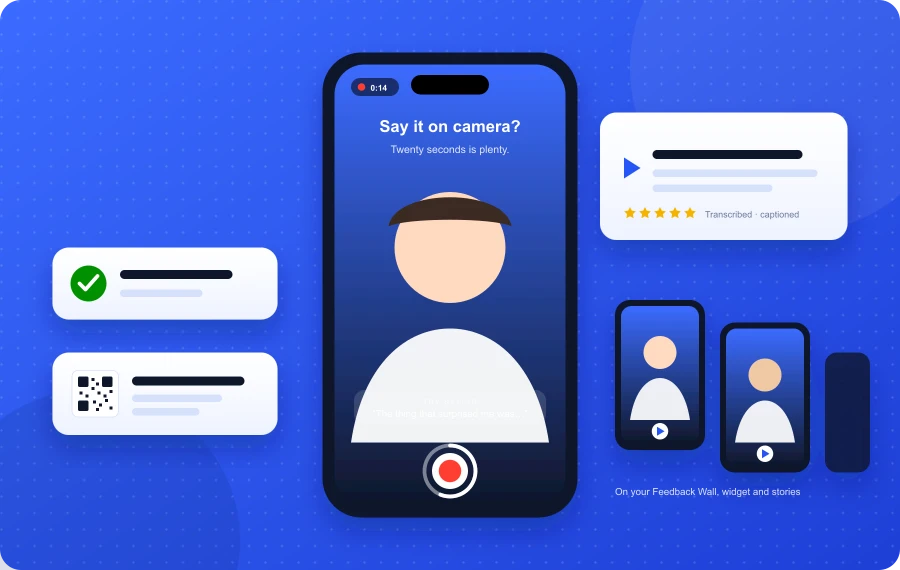
This works without a crew because the customer already carries a good camera and microphone. The recorder just needs to get out of the way. The screen should show:
One question, written out. Not "tell us about your experience." Something like "What did you order, and would you come back?" or "What made you pick us, and did we deliver?" The question keeps the clip short and on topic.
A record button and a time limit. Sixty seconds at most. Most good clips are under 30.
A retake option. People stumble on the first try. Let them do it again without starting over.
A consent checkbox and a display name field. Both on the same screen as the recording, not buried in a later email. More on the wording below.
No app, no account. If the customer has to install anything, you lose most of them.
Offer a voice-only option too. Some customers will not show their face but will happily talk for 20 seconds, and a voice clip with a transcript is still a testimonial.
Good prompts by business type
Hotel: "What was the best part of your stay, and who made it happen?"
Restaurant: "What did you order, and what would you tell a friend to get?"
Salon or spa: "What did you come in for today, and how do you feel about the result?"
Home services: "What was the problem, and how did it go?"
Clinic or studio: "What were you hoping for when you booked, and did you get it?"
Online store: "Open the box on camera. What do you think?"
Each prompt asks for a concrete detail, and concrete details are what make a stranger believe the person on screen.
Step 3: Consent and usage rights in plain language
A testimonial you cannot prove you had permission to publish is a liability, not an asset. The rules are not complicated. Write them down once and let the recorder enforce them.
What you are asking permission for
Say, in the customer's language, exactly what you want to do with the recording. A consent line that covers the common cases:
I give Harbor Lane Bistro permission to show this recording on their website, in their social media posts, and in their marketing, with the display name I enter below. I can ask them to take it down at any time by emailing [email protected].
That one sentence names who gets the permission, where the clip can appear, what name will be shown, and how to withdraw. If you plan to use clips in paid ads, say "advertising." If you might add captions or trim, say so. Do not ask for more than you will use. "Any purpose, in perpetuity, worldwide" reads like a trap and fewer people tick the box.
Capture the consent with the clip
Store, per recording: the exact consent text the customer saw, the time they agreed, the display name they chose, and the recording itself. If someone later asks "did I agree to this?", you can answer with the wording and the timestamp. If a customer asks for removal, honor it quickly and note the date.
Thank-you gifts and disclosure
You can thank someone for taking the time to record. In the United States, the Federal Trade Commission's rules on consumer reviews and testimonials and its Endorsement Guides require that any material connection between you and the person endorsing you be disclosed, and they prohibit testimonials that misrepresent the person's actual experience. In practice:
Give the same thank-you to everyone who records, whatever they say. Never tie it to a positive message.
Show a short note wherever a rewarded clip appears, such as "This customer received a thank-you gift for recording."
Never offer anything in exchange for posting a public review on Google or another platform. That is a separate rule, and platforms enforce it.
Never script the words. A prompt is a question. A script is a fake testimonial.
This is not legal advice. Rules differ by country, and if you operate in several, have someone check your consent wording once.
Who not to record
Minors. Do not publish a clip of anyone under 18 without a parent or guardian recording the consent themselves.
Other people in frame. If a stranger is clearly visible or audible behind the customer, decline the clip or ask for a retake.
Staff who did not agree. A customer naming "John at the front desk" is fine. A customer filming John is a conversation to have with John first.
Health and other sensitive details. Clinics and anyone handling personal information should keep prompts about the service, not the condition.
Step 4: Approval before anything goes public
Every clip waits for a person. The queue should show the video, the transcript, the consent record, and the check-in rating. Ten seconds per clip is enough. Decline anything that:
Has no clear audio, or is mostly background noise.
Names a competitor or another customer.
Makes a claim you cannot stand behind ("they cured my back pain").
Shows anyone who did not consent.
Was clearly recorded by someone other than the customer.
Do not decline a clip for being awkward. Awkward is believable. Polished is suspicious.
What makes a 30-second clip usable
You will not be editing these, so the raw clip has to work as recorded. Most of that is decided by the prompt and the setup, not by the customer.
One specific thing. "The chicken was great" is forgettable. "I ordered the lemon chicken and my daughter stole half of it" is a testimonial. The prompt does this for you if it asks for a detail.
Vertical, face in frame, phone at eye level. Vertical plays natively on phones and in stories. A line of on-screen guidance ("hold your phone upright, face the light") fixes most framing problems.
Quiet enough to transcribe. If the automatic transcript is readable, the audio is good enough. If it is not, ask for a retake somewhere quieter.
The name of the business or the person. Clips that mention "Maria at the salon" or "Harbor Lane" carry context when shared on their own.
A natural ending. A clip that stops mid-sentence is hard to use. A countdown in the last five seconds helps people wrap up.
Captions. Many people watch with sound off. Generate captions from the transcript and burn them in or attach them, every time.
If someone talks for 50 seconds and it is all good, use it. If they talk for 12 and say one true thing, use that too.
What to do with the clips
Decide the destinations in advance so approval also means publication.
Your testimonials page. A wall of short videos, each with the display name, the date, and the transcript below it for people who do not press play and for search engines. For layouts that work, see these testimonial page examples.
The page where the decision happens. A hotel's booking page, a restaurant's reservations page, a service company's quote form. One or two clips near the button, not a gallery.
Social stories and posts. A vertical clip with your logo, the rating, and a caption over it is a ready-made story. Post one a week and you never run out of content.
Internally. Play the week's clips at the team meeting. Staff hear their names.
Do not re-cut what the customer said. Trim silence at the start and end, add captions, add your branding around the clip. Leave the words alone.
A setup you can run this week
Pick one trigger you already have: checkout, job completion, delivery, class end.
Write one prompt question that asks for a detail, and one consent line that names where the clip can appear.
Set the sequence: check-in, review invitation, testimonial request, with a recovery conversation for anyone who was unhappy.
Name one person who approves clips, and decide the two places every approved clip goes by default.
Record one yourself on your own phone first, so you know what the customer sees.
If you would rather not wire this together by hand, FeedbackRobot's video testimonials do the whole loop: the recorder is a question you add to any survey, consent and a display name are captured with each clip, every recording is transcribed and waits for your approval, and approved clips go to your website wall and to Spotlight for social. The ask itself can run as part of the Get-reviews sequence, so the check-in, the review invitation, and the testimonial request go out on their own after each visit.
Either way: ask everyone, ask right after the good moment, ask one question, get consent in writing, and let a person approve before anything is shown. The film crew was never the hard part. Remembering to ask was.
How do you collect video testimonials automatically?
Tie the request to a trigger you already track, such as a checkout or a completed job. Send every customer a one-question check-in, follow a good answer with an invitation to record a short video on their phone, capture consent and a display name on the same screen, and route every clip to an approval queue before it is published.
How long should a video testimonial be?
Between 15 and 45 seconds. Cap the recorder at 60 seconds and give the customer one specific question so they do not need the full time. Short clips are easier to watch, share, and caption.
Do I need written consent to use a customer's video testimonial?
Yes. Get permission that names where the clip can appear (website, social media, advertising), what name will be shown, and how the customer can withdraw. Store the consent wording and timestamp with each recording. If you offer a thank-you for recording, disclose it wherever the clip appears and never tie it to what the customer says.
Can I offer a discount for a video testimonial?
You can thank customers for their time, as long as the same thank-you goes to everyone who records regardless of what they say, and you disclose it where the testimonial appears. Never offer anything in exchange for a public review on Google or another platform, and never script the words.
What if an unhappy customer gets the testimonial request?
They should not get it first. The check-in comes before the invitation. A customer who reports a problem gets a conversation and a fix. Once it is resolved, inviting them to record is fair, and those clips are often the most convincing ones you will collect.
Stop reading about it. Let your agent handle it.
25 free AI actions · no credit card required
Start Free