12 Best Survey Tools for Small Business (2026)
Ranked by ease of setup, automation depth, and cost per response — not by who pays for placement. Includes one free option with AI response analysis built in.

Jan 1, 2026 · 25 min read
Free tool
AI Survey Generator
Describe what you want to learn and get a ready-to-send survey in seconds.
Finding the best customer survey tools for small business can feel overwhelming. You know gathering feedback is critical for growth, but sifting through dozens of platforms is a major time drain for a busy owner. The right tool doesn't just ask questions; it helps you collect smarter, act faster, and grow stronger. For hospitality and service businesses, where guest experience directly impacts your bottom line, a simple form builder isn't enough. You need a system that turns feedback into action.
This guide cuts through the noise. We've analyzed the top platforms, focusing on the features that matter most to owners and operators like you. Before diving in, remember that effective Online Reputation Management for Small Business starts with proactive feedback collection. The right tool is your best source for operational insights and your first line of defense against negative reviews.
Here, you will find a detailed breakdown of each option, evaluating their specific strengths, limitations, and ideal use cases. Whether you run a bustling restaurant, a multi-location hotel, or a professional services firm, this list will help you identify the platform that fits your operational needs and budget. We'll explore everything from simple forms to sophisticated feedback systems, empowering you to make a confident decision without wasting hours on research.
1. FeedbackRobot: The Feedback Operating System for Service Businesses
FeedbackRobot is more than just a survey tool; it's a Feedback Operating System designed for busy hospitality and service owners. Its entire purpose is to help your team collect smarter, act faster, and grow stronger by turning scattered customer comments into a streamlined, actionable workflow. This platform is the standout choice for any small business that needs to manage online reviews and direct feedback in one place and automate service recovery.
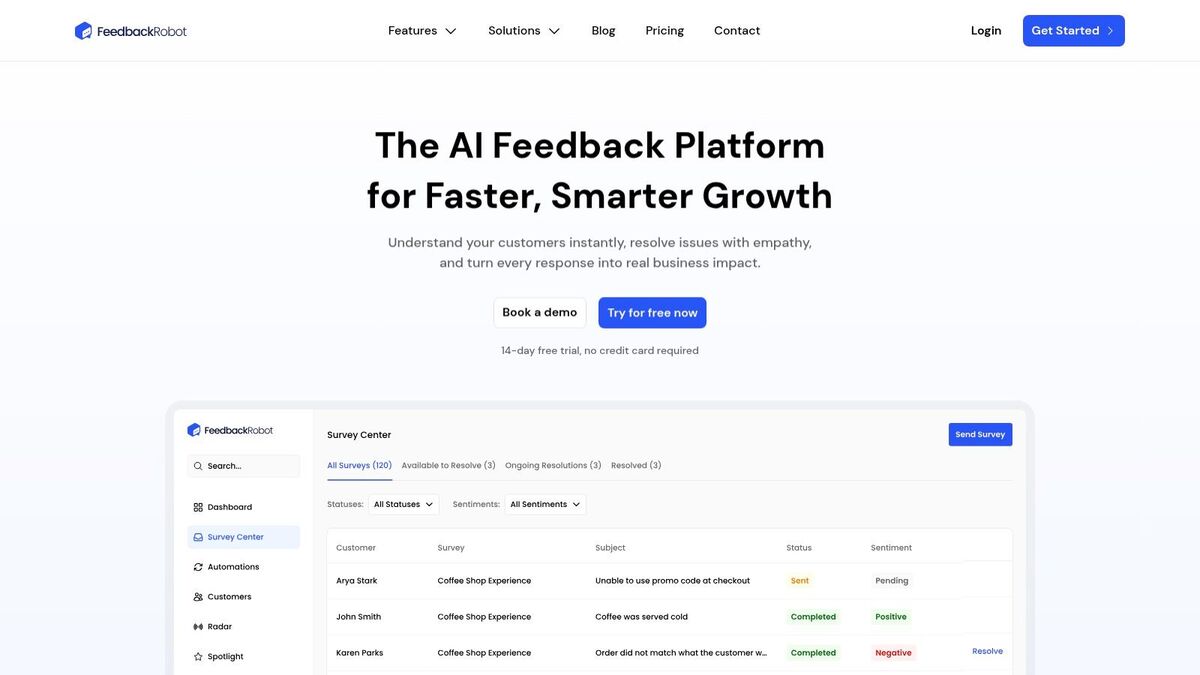
What makes FeedbackRobot different is its operational focus. It replaces the manual work of building surveys, reading every review, and drafting responses with intelligent automation. This makes it one of the best customer survey tools for small business teams who are short on time but serious about guest experience.
If you want to run recurring short-form check-ins rather than periodic full surveys, pulse surveys are the right format. Our pulse survey questions template gives you 50 questions and two copy-paste formats ready to use.
Key Features: The Feedback Operating System
FeedbackRobot is built on four powerful, interconnected features that manage the entire feedback lifecycle:
Prompt to Survey: This AI feature dramatically speeds up survey creation. Forget clunky builders. Simply type a command like, "Create a short survey for post-checkout feedback at my hotel," and the AI generates a relevant, ready-to-send survey in seconds. This is about collecting smarter data, faster.
Radar: This is your unified review intelligence dashboard. Radar pulls reviews and feedback from Google, Yelp, booking sites, and direct surveys into a single view. No more logging into a dozen platforms. Instantly track trends, spot recurring issues, and monitor your brand's reputation in one place.
AI Summaries: Stop drowning in feedback. AI Summaries provide instant insights and sentiment analysis. The system analyzes every piece of feedback, identifies if it's positive or negative, and automatically tags key themes like "staff friendliness" or "room cleanliness." You get a high-level understanding of what's working and what isn't, at a glance.
Resolutions Engine: This is where you act faster and turn feedback into growth. The Resolutions Engine provides automated service recovery. You can set rules so a negative review automatically drafts an empathetic reply, creates a support ticket for your manager, and sends a discount to the guest. It turns a bad experience into a loyal customer before it escalates online.
Pricing and Plans
FeedbackRobot offers a scalable pricing structure with a 14-day free trial that doesn't require a credit card.
The platform’s real power is unlocked in the Scale plan, where automations and integrations create a truly hands-off feedback loop that drives operational excellence.
Who is FeedbackRobot Best For?
FeedbackRobot is the perfect fit for service-oriented businesses aiming to make guest feedback a central part of their operations. Hotel groups, restaurant owners, and professional service firms will find the unified inbox and automated resolution workflows essential for managing a high volume of customer interactions. If your goal is to reduce response times, prevent negative reviews, and use customer sentiment to guide business decisions, FeedbackRobot provides the intelligent toolkit to make it happen.
Website: https://www.feedbackrobot.com
2. SurveyMonkey
SurveyMonkey is a household name, making it one of the most familiar and best customer survey tools for small businesses looking for a scalable and feature-rich platform. Its primary strength lies in its massive library of over 500 expert-built templates and more than 1,800 pre-written questions. This resource, combined with its AI-assisted survey creation, significantly speeds up the process of building effective questionnaires, a crucial advantage for busy teams.
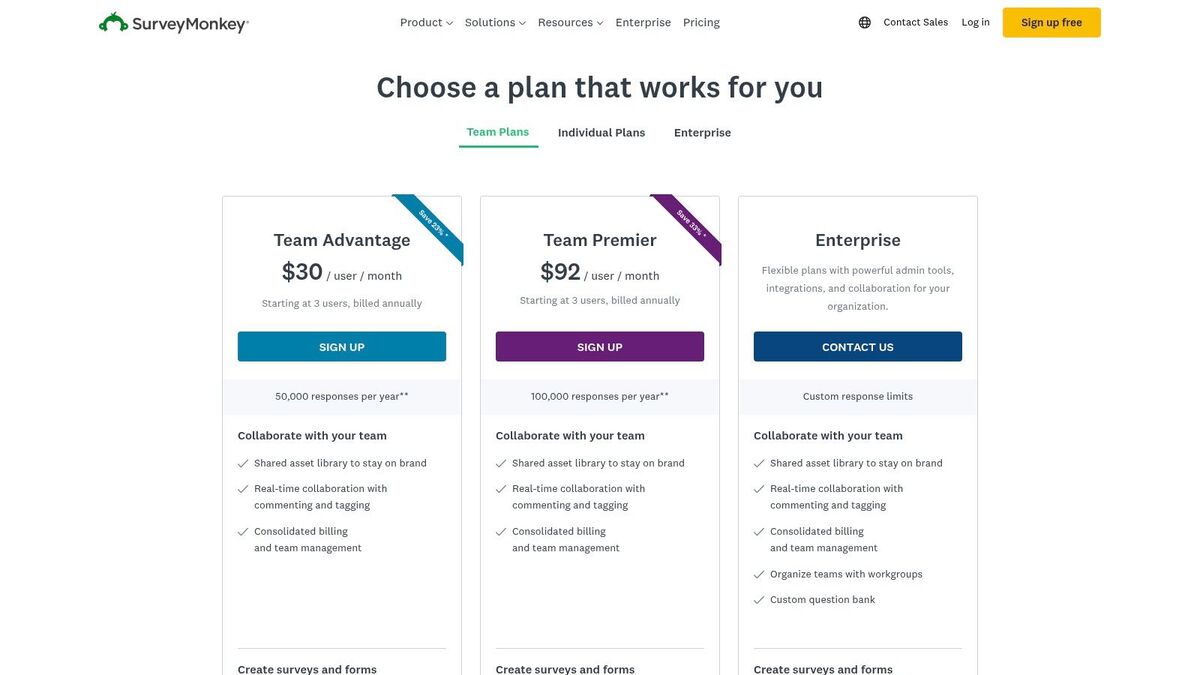
The platform supports multi-channel distribution, allowing you to reach customers via web links, email, QR codes, or embedded forms. For businesses using systems like HubSpot or Slack, SurveyMonkey's 200+ integrations offer seamless data flow.
Key Features & Use Cases
AI-Assisted Creation: "Build with AI" feature suggests questions and structures based on your survey goals.
Team Collaboration: Robust governance controls, including user roles and permissions, make it suitable for growing teams where multiple staff members need to create or analyze surveys.
Distribution Flexibility: Ideal for professional services firms that need to deploy surveys across various client touchpoints, from post-consultation feedback to event follow-ups.
Pros & Cons
Pros | Cons |
|---|---|
Easy Team Rollout: Familiar interface and strong admin controls. | Response Caps: Paid plans have overage fees (e.g., $0.15/response). |
Deep Template Library: Speeds up the survey creation process. | Seat Minimums: Team plans require a minimum number of users. |
Good Governance: Strong security for regulated industries. | Cost can scale quickly: Expenses can add up with more users and responses. |
Pricing & Final Thoughts
SurveyMonkey offers a free basic plan, with paid Team Advantage plans starting at $25 per user/month (billed annually, with a 3-user minimum). It's an excellent choice for businesses that prioritize brand recognition, extensive templates, and strong administrative controls. However, small businesses should carefully monitor response volumes to avoid unexpected overage fees. For an in-depth guide on crafting effective questions, see our advice on how to create a questionnaire.
3. Typeform
Typeform distinguishes itself with a conversational, design-forward approach that makes filling out surveys feel more like a friendly chat. This focus on user experience often leads to higher completion rates, making it one of the best customer survey tools for small businesses, especially consumer-facing brands in retail or hospitality that prioritize a strong, on-brand aesthetic. Its "one question at a time" format is less intimidating for users and is highly effective on mobile devices.
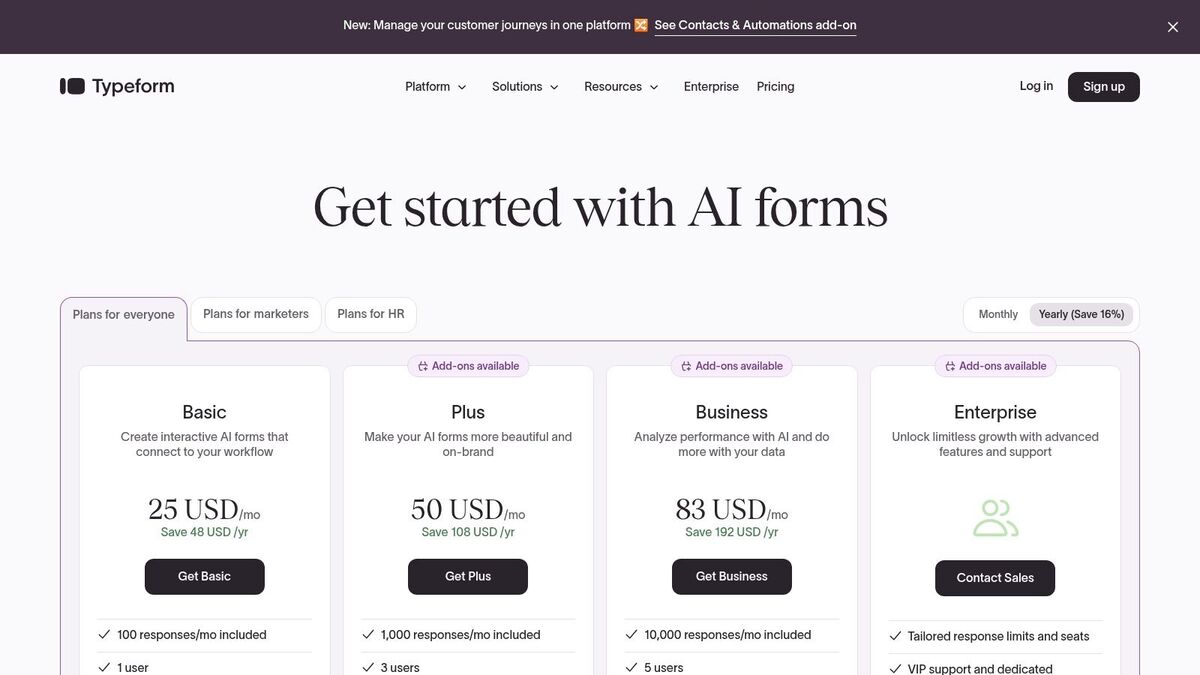
The platform shines in creating visually appealing, interactive forms that can be fully customized with unique layouts, themes, and branding. With over 300 integrations, including connections to HubSpot, Slack, and Google Analytics, Typeform ensures that the valuable feedback you collect flows directly into your existing marketing and operational workflows.
Key Features & Use Cases
Conversational Interface: The one-question-at-a-time flow is perfect for engaging product feedback surveys or customer satisfaction forms where a human touch is key.
Advanced Design Customization: Ideal for e-commerce brands needing to embed lead capture forms or post-purchase surveys that perfectly match their website's look and feel, using custom subdomains and premium themes.
Engagement Analytics: Built-in tools track drop-off rates and conversions, helping you optimize questions to maximize the number of completed responses.
Pros & Cons
Pros | Cons |
|---|---|
Strong UX and Design: Creates beautiful, engaging surveys. | Cost increases with responses: Higher tiers are needed for more volume. |
Clear Usage Limits: Easy to understand and upgrade as you grow. | Advanced Automations: Some features may require more costly add-ons. |
Priority Support: Live chat and priority help on higher plans. | Limited Free Plan: The free version is quite restrictive on responses. |
Pricing & Final Thoughts
Typeform offers a limited free plan, with paid plans starting at $25 per month (billed annually), which includes 100 responses. Its pricing is primarily based on the number of monthly responses, making it a scalable but potentially expensive option for businesses with high survey volumes. It is the go-to choice for companies that value brand identity and want to provide a superior, interactive experience for their customers. For more details on pricing, visit their official pricing page.
4. Jotform
Jotform has carved a niche as one of the most versatile and best customer survey tools for small business, excelling as an all-in-one form and data collection platform. Its strength is a powerful drag-and-drop builder complemented by an extensive library of over 10,000 templates and a rich ecosystem of widgets. This makes it incredibly easy for businesses in healthcare or professional services to create everything from detailed patient intake forms to client feedback surveys.
The platform offers robust analysis tools like Jotform Tables and a Report Builder, allowing users to visualize submission data without leaving the app. For small businesses that handle sensitive information, the Gold plan provides an option for HIPAA compliance, a critical feature for wellness clinics and healthcare providers. Its generous free plan and straightforward paid tiers offer significant value, making advanced data collection accessible.
Key Features & Use Cases
Drag-and-Drop Builder: An intuitive interface with a vast selection of widgets for creating highly customized forms and surveys.
Jotform Tables & Reporting: Built-in tools to manage and analyze submission data in a spreadsheet or visual report format, ideal for tracking customer satisfaction trends.
HIPAA Compliance Option: The Gold plan helps healthcare businesses meet patient data privacy requirements.
Payment & CRM Integrations: Seamlessly connect with tools like PayPal, Stripe, and HubSpot to process payments or sync contact data directly from form submissions.
Pros & Cons
Pros | Cons |
|---|---|
Excellent Value: Generous limits on lower-priced and free plans. | Tiered Limits: Form, submission, and storage caps require upgrades. |
Broad Integrations: Connects to payment gateways and CRMs. | Enterprise Plan Needed: Multi-user management is limited on lower tiers. |
24/7 Support: Reliable customer service and a money-back guarantee. | Can Be Overkill: May be too complex if only simple surveys are needed. |
Pricing & Final Thoughts
Jotform offers a robust free plan, with paid plans starting at $34 per month (billed annually). It’s an outstanding choice for small businesses that need a flexible tool for more than just surveys, including order forms, event registrations, and applications. The combination of powerful features, strong integration support, and accessible pricing makes it a top contender. For more details on pricing, visit their website at https://www.jotform.com/pricing.
5. Zoho Survey
For small businesses already invested in the Zoho ecosystem, Zoho Survey offers a seamless and budget-friendly solution, making it one of the best customer survey tools for small business owners looking for integration. Its key advantage is its generous paid plans, which offer unlimited surveys and questions, allowing companies to gather extensive feedback without worrying about hitting a ceiling. This is particularly useful for professional services firms needing to conduct regular, in-depth client check-ins.
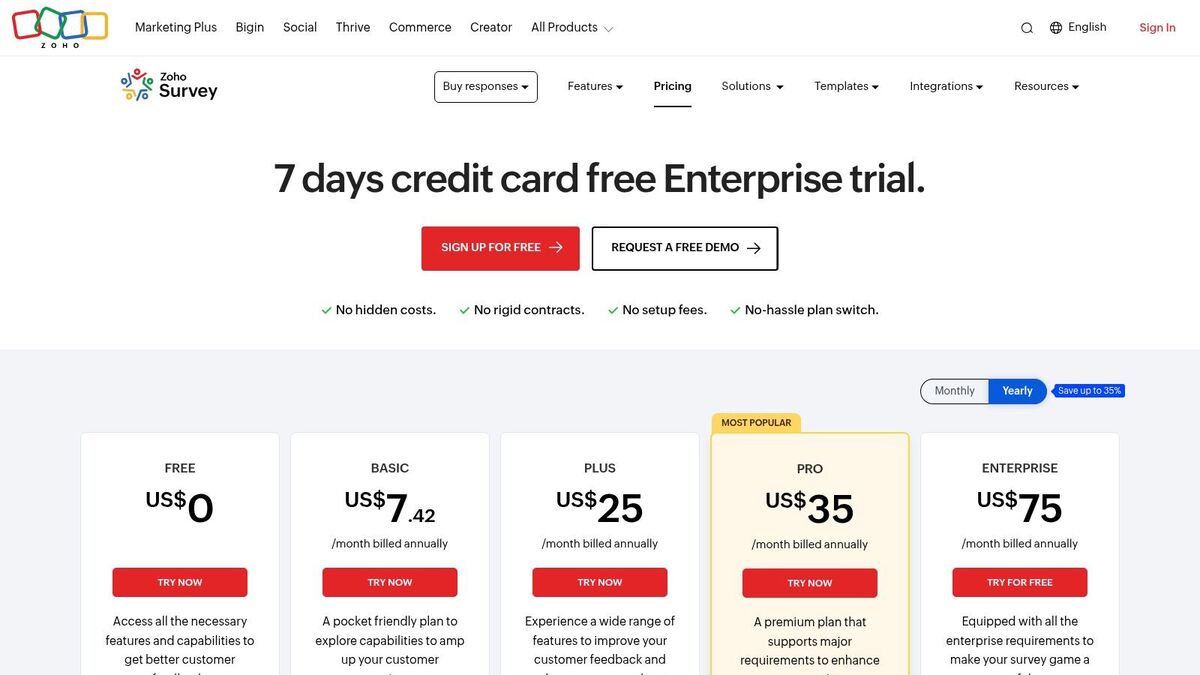
The platform stands out with robust multilingual support, offering over 26 UI languages and multilingual reports, a critical feature for hospitality brands serving an international clientele. Its integrations with Zoho CRM, Desk, and Sheets create a unified data environment, streamlining workflows and connecting feedback directly to customer profiles.
Key Features & Use Cases
Native Zoho Integration: Automatically sync survey responses with Zoho CRM contacts or create support tickets in Zoho Desk, creating a closed-loop feedback system.
Offline Data Collection: The mobile app allows for data collection without an internet connection, perfect for trade shows, on-site service feedback in healthcare, or restaurant table-side surveys.
Multilingual Support: Easily create and distribute surveys in multiple languages and analyze the results in a unified report, ideal for businesses with a diverse customer base.
Pros & Cons
Pros | Cons |
|---|---|
Excellent Value: Generous limits and features for the price. | Advanced Features Gated: White-labeling is on higher-tier plans only. |
Strong Zoho Ecosystem Fit: Perfect for current Zoho users. | Regional Pricing: Pricing visibility can vary depending on your location. |
Offline Mode Included: Great for field research or events. | UI Less Modern: The interface is functional but less sleek than some rivals. |
Pricing & Final Thoughts
Zoho Survey offers a free plan with paid options starting at a very competitive price point. The real power is unlocked for businesses that already use other Zoho products, as it transforms from a standalone tool into a core part of a larger business operating system. While it may lack the polished UI of some competitors, its feature set and integration capabilities provide exceptional value. For guidance on turning this data into action, see our guide on building a customer feedback and response system.
6. SurveySparrow
SurveySparrow stands out by offering a dual approach to feedback collection, providing both classic forms and modern, chat-style surveys. This conversational format can increase engagement, making it one of the best customer survey tools for small businesses in retail or hospitality seeking a more interactive and user-friendly experience. Its platform is designed for omnichannel feedback, ensuring you can connect with customers wherever they are.
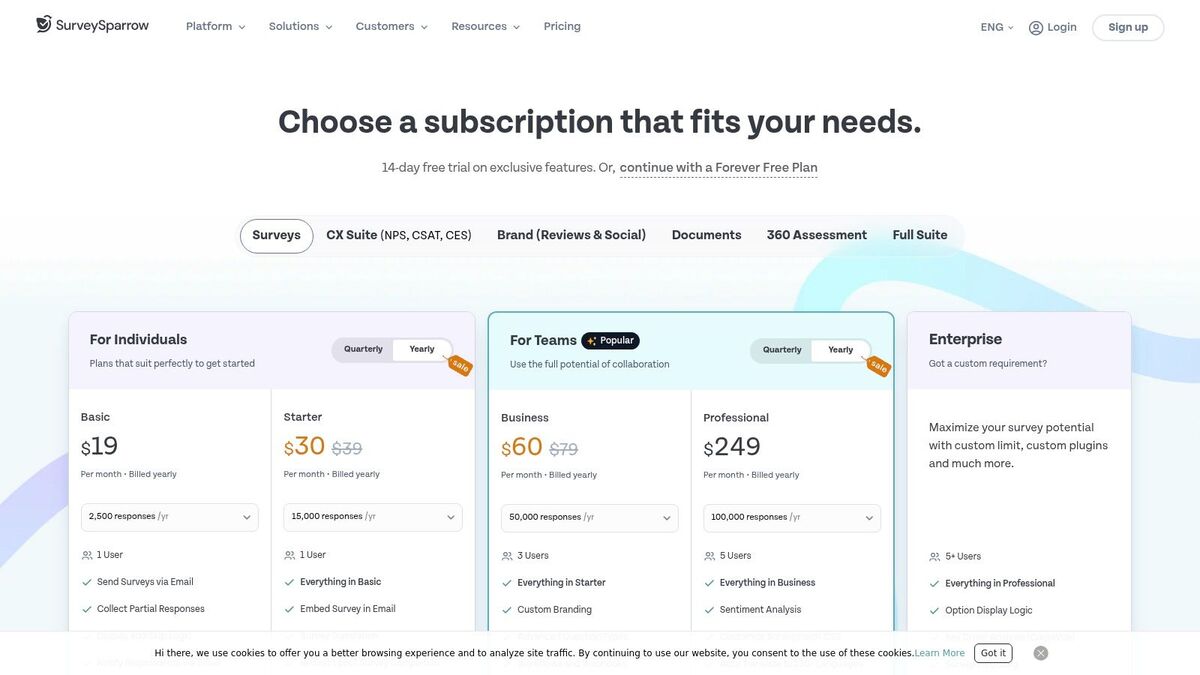
The platform includes dedicated suites for NPS, CSAT, and CES, allowing businesses to track key experience metrics systematically. With features like partial response tracking and multi-language support, SurveySparrow helps capture a wider range of insights, even from incomplete submissions.
Key Features & Use Cases
Conversational Surveys: Chat-like interface provides a modern user experience that can boost completion rates, perfect for mobile-first audiences.
Omnichannel Distribution: Deploy surveys via email, web links, embeds, and QR codes, making it ideal for restaurants collecting in-person feedback or e-commerce sites gathering post-purchase opinions.
Automation & Integrations: Connects with tools like Slack and Power BI to automate workflows and consolidate feedback data for deeper analysis.
Pros & Cons
Pros | Cons |
|---|---|
Engaging User Interface: Modern, clean design is quick to brand and deploy. | Opaque High-Tier Pricing: Business plan pricing requires contacting sales. |
Generous Free Plan: A free tier and 14-day trials are available. | Usage Limits: Paid plans have email and response caps, which may require add-ons. |
Good for Non-Profits: Offers discounts for startups, education, and NGOs. | Can Become Complex: Advanced features may have a steeper learning curve. |
Pricing & Final Thoughts
SurveySparrow offers a free plan, with paid options like the Basic plan starting at $19 per month (billed annually). It’s an excellent choice for businesses aiming to modernize their feedback process with engaging, conversational surveys. However, be mindful of the usage limits on paid plans, as scaling may require purchasing add-ons for additional responses or email sends. For more information, visit the SurveySparrow pricing page.
7. Google Forms
For small businesses or startups needing a straightforward, no-cost solution, Google Forms is a standout choice. As part of the Google Workspace suite, its greatest strength is its seamless integration with Google Sheets, making it incredibly simple to collect and analyze data without a learning curve. It's a highly accessible tool for quick internal feedback, simple event registrations, or basic customer satisfaction surveys where elaborate features aren't required.
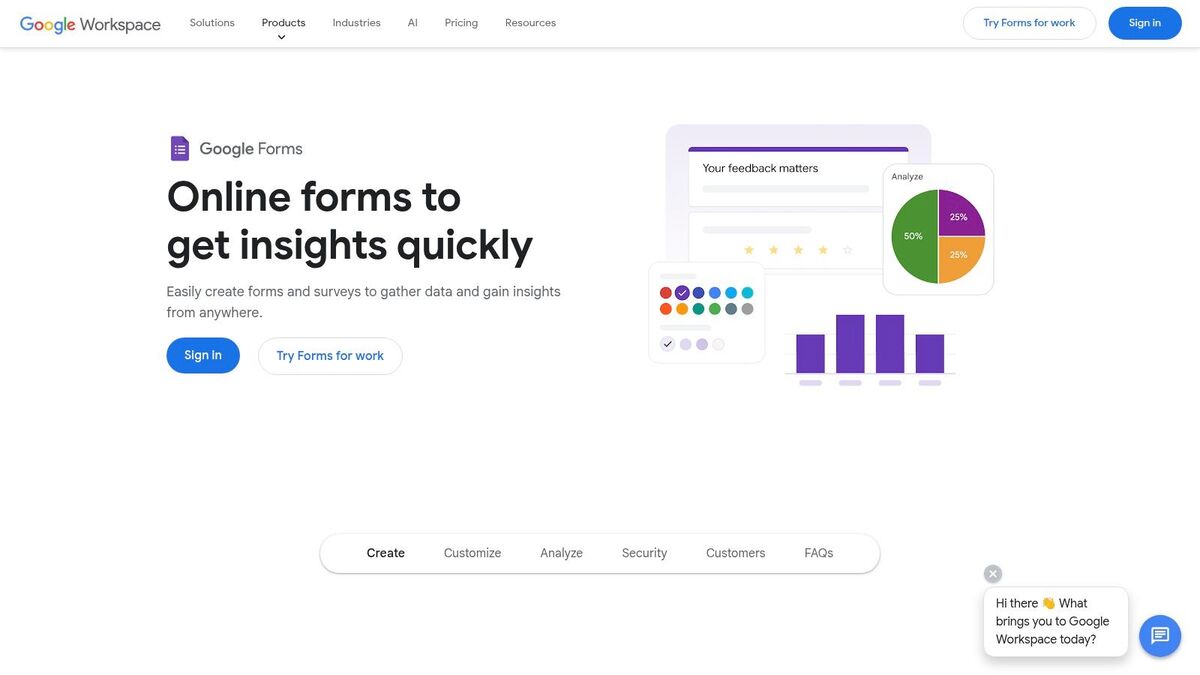
The platform offers a clean, easy-to-use builder with basic templates and conditional logic to guide respondents through relevant questions. While it lacks the sophisticated analytics of dedicated platforms, its direct data export to Google Sheets offers powerful, albeit manual, analysis possibilities for businesses in professional services or retail looking to get started with feedback collection.
Key Features & Use Cases
Seamless Google Sheets Integration: All responses are instantly populated in a spreadsheet, perfect for manual data sorting, charting, and sharing.
Collaboration & Sharing: Like other Google Workspace apps, multiple team members can edit a form in real-time and easily share it via link or by embedding it on a website.
Cost-Effective Data Collection: Ideal for simple use cases like collecting contact information, running a quick poll on social media, or gathering post-event feedback from a small group.
Pros & Cons
Pros | Cons |
|---|---|
Completely free: No cost for basic needs and no response limits. | Limited branding: Customization options are minimal. |
Extremely easy to use: Almost no learning curve is required. | Fewer advanced question types: Lacks matrix questions or sliders. |
Strong data portability: One-click export to Google Sheets. | Minimal native integrations: Requires add-ons or APIs for complex workflows. |
Pricing & Final Thoughts
Google Forms is free with any Google account. For businesses using Google Workspace (starting at $6 per user/month), it includes enterprise-level security, administrative controls, and support. It is an unbeatable starting point for any small business dipping its toes into data collection. While it may not scale for complex customer experience programs, it remains one of the best customer survey tools for simple, quick, and cost-free feedback gathering. Explore it at Google Forms.
8. Microsoft Forms
For small businesses already integrated into the Microsoft ecosystem, Microsoft Forms is a straightforward and cost-effective choice. It stands out as one of the best customer survey tools for small businesses that don't need a specialized research suite but require a simple way to gather feedback. Its primary advantage is that it’s included with most Microsoft 365 Business and Enterprise plans, eliminating the need for an additional software subscription.
The platform offers a lightweight and user-friendly interface for creating basic surveys and quizzes. Distribution is simple via web links, QR codes, or direct sharing within Microsoft Teams, making it perfect for quick internal polls or collecting straightforward customer feedback after a professional services engagement. Real-time results are displayed graphically and can be instantly exported to Excel for deeper analysis.
Key Features & Use Cases
Seamless Microsoft 365 Integration: Launch surveys directly within Teams and automatically sync responses to an Excel spreadsheet for easy data manipulation and reporting.
Enterprise-Grade Security: Inherits the security, compliance, and governance controls of your Microsoft 365 tenant, a crucial benefit for healthcare or legal firms handling sensitive data.
Basic Automation: Connects with Power Automate to trigger workflows, such as sending a follow-up email or creating a task in Planner based on a survey response.
Pros & Cons
Pros | Cons |
|---|---|
No Extra Cost: Included with most existing Microsoft 365 plans. | Limited Features: Lacks advanced question types and deep branding. |
Simple to Use: Easy interface for quick survey creation and analysis. | Requires Subscription: Only available to Microsoft 365 subscribers. |
Secure & Compliant: Leverages Microsoft's robust security framework. | Not a Full Research Suite: Unsuitable for complex market research. |
Pricing & Final Thoughts
Microsoft Forms is included with Microsoft 365 Business plans, which start at $6.00 per user/month. It is an excellent, no-frills option for businesses deeply embedded in the Microsoft environment that need a secure, simple tool for basic feedback collection. While it lacks the advanced analytics and specialized features of dedicated platforms, its seamless integration with tools like Excel and Teams provides significant value and efficiency for everyday survey needs. You can learn more at the official Microsoft 365 Business pricing page.
9. QuestionPro
QuestionPro stands out as one of the best customer survey tools for small businesses that need a robust, scalable platform with strong support. It strikes a balance between advanced features and user-friendliness, offering a comprehensive suite of question types, sophisticated logic, and branding controls that allow businesses to maintain a professional appearance. The platform is particularly well-suited for teams that anticipate growing their feedback programs over time.
Its clear upgrade path from a generous free plan to a multi-user Team Edition and beyond makes it a predictable and manageable investment. For businesses in professional services or healthcare that require reliable assistance, QuestionPro’s commitment to 24/7 chat and email support is a significant advantage, ensuring help is available whenever it's needed.
Key Features & Use Cases
Advanced Survey Logic: Use skip logic and branching to create dynamic surveys that adapt to customer responses, ideal for detailed post-service feedback in hospitality.
Branding & Customization: Apply custom logos, colors, and fonts to ensure surveys align with your brand identity, crucial for maintaining a consistent customer experience.
Team Collaboration: The Team Edition provides a centralized workspace for small groups to create, distribute, and analyze surveys collaboratively, with clear user management.
Pros & Cons
Pros | Cons |
|---|---|
Excellent Support: 24/7 availability is a major plus for busy teams. | Tiered Features: Advanced logic is locked behind higher-tier plans. |
Clear Upgrade Path: Easy to scale from free to paid team plans. | Annual Billing Focus: Monthly plans are less common, favoring annual commitments. |
Good Governance: Regional data centers help with compliance. | Response Limits: Higher volumes require upgrading to more expensive plans. |
Pricing & Final Thoughts
QuestionPro offers a powerful free "Essentials" plan, with its "Advanced" plan starting at $99 per month (billed annually). Its Team Edition offers a custom solution for small groups needing collaboration features. QuestionPro is an excellent choice for businesses looking for a future-proof tool with a strong feature set and dependable support. However, teams should be mindful that accessing its most powerful capabilities and higher response limits requires a commitment to its premium tiers. For more details, visit their pricing page.
10. Alchemer (formerly SurveyGizmo)
Alchemer, formerly known as SurveyGizmo, stands out as one of the best customer survey tools for small businesses that need more power and configurability than entry-level platforms offer. It's built for those who require advanced logic, scripting, and in-depth analysis without the full complexity and cost of enterprise-grade software. The platform offers generous annual response allowances and unlimited surveys, making it a strong choice for professional services firms or healthcare providers running frequent, complex feedback initiatives.
Its strength lies in providing a clear upgrade path. A small business can start with a robust individual plan and scale up to Alchemer's full business platform, which adds features like SSO and advanced integrations as the company's needs evolve. This scalability ensures the tool can grow alongside your business.
Key Features & Use Cases
Advanced Question Logic: Utilize sophisticated branching, piping, and scripting to create highly dynamic and personalized survey experiences.
Configurable Reporting: Go beyond basic charts with advanced reporting tools that allow for deep data segmentation and analysis, perfect for detailed market research or patient satisfaction studies.
Branding & Customization: Higher-tier plans provide extensive branding options and custom templates, allowing agencies to deliver fully white-labeled surveys for their clients.
Pros & Cons
Pros | Cons |
|---|---|
Advanced design & analysis: More powerful than many SMB tools. | Per-seat pricing adds up: Cost can escalate quickly for small teams. |
High response allowances: Generous annual caps on paid plans. | Features locked in tiers: Key functions require higher-priced plans. |
Full-feature trial: A 7-day trial lets you test all capabilities. | Requires a credit card: Trial access requires payment information upfront. |
Pricing & Final Thoughts
Alchemer offers several plans, starting with the Collaborator plan at $55 per user/month (billed annually). While the per-user pricing can be a consideration for larger teams, its advanced capabilities offer significant value for businesses that have outgrown simpler tools. It's the ideal choice for companies needing precise control over survey logic and deep analytical power. For more details on their offerings, visit Alchemer's pricing page.
11. Qualtrics
Qualtrics is a powerhouse in the research world, offering an enterprise-grade platform (CoreXM) that's also accessible to smaller teams needing sophisticated analysis. Its main advantage is the sheer depth of its research capabilities, allowing businesses to move beyond simple feedback forms into complex studies like conjoint analysis. This makes it one of the best customer survey tools for small businesses with advanced research needs or those operating in regulated industries like healthcare.
The platform supports a vast range of question types, including audio and video feedback, and provides advanced logic and branching for creating highly tailored survey paths. While traditionally seen as a tool for large corporations, its online plans make these powerful features available for single projects or smaller, ongoing programs, offering a clear upgrade path as a business grows.
Key Features & Use Cases
Advanced Question Types: Use audio, video, heatmaps, and sliders to gather rich, nuanced customer data far beyond standard multiple-choice questions.
Complex Research Logic: Ideal for professional services or product development teams that need to run sophisticated market research, such as pricing studies or feature prioritization.
Scalable Programs: A small business can start with a single feedback project and scale up to a full customer experience (CX) program without changing platforms.
Pros & Cons
Pros | Cons |
|---|---|
Very powerful for complex research: Unmatched analytical depth. | Pricey for SMBs: Can be expensive compared to other tools. |
Scales from single study to program: Grows with your business. | Response limits: Online plans have annual response caps. |
Broad support and resources: Extensive knowledge base and methods. | Overwhelming for simple needs: May be too complex for basic surveys. |
Pricing & Final Thoughts
Qualtrics offers a free account with limitations, and its paid online plans provide access to its advanced CoreXM features with unlimited surveys, questions, and users. It’s the right choice for businesses that require rigorous, academic-level research capabilities and plan to scale their feedback programs significantly. However, its cost and complexity might be overkill for businesses that only need simple feedback collection. For insights into modern data analysis, read about the applications of AI survey analysis.
12. Capterra (Survey Software for Small Businesses)
While not a survey tool itself, Capterra's directory is an indispensable resource for finding the best customer survey tools for small businesses. It functions as a comprehensive comparison marketplace, allowing you to filter hundreds of options by features, pricing models, and user ratings. This approach is particularly useful for retail or hospitality managers who need to quickly evaluate platforms based on specific criteria, such as POS integrations or multi-language support, before committing.
The platform's main value comes from its vast collection of verified user reviews and side-by-side comparison tables. This data provides a layer of social proof and real-world insight that is often missing from vendor marketing materials. Instead of visiting dozens of websites, you can build a qualified shortlist in one place, saving valuable time during the research phase.
Key Features & Use Cases
Small-Business Filters: Pre-configured filters to specifically see software that is popular or highly-rated among small businesses.
Verified User Reviews: Access thousands of reviews from actual users, offering honest feedback on usability, customer support, and feature performance.
Side-by-Side Comparisons: Select multiple tools and compare their features, pricing, and ratings in a clear, structured format, ideal for presenting options to a team.
Pros & Cons
Pros | Cons |
|---|---|
Fast Way to Narrow Choices: Quickly filter by budget and key features. | Popularity Isn't Always Best Fit: The top-rated tool may not suit your specific niche. |
High Volume of Verified Reviews: Improves confidence in your selection. | Sponsored Placements: Be aware that some listings may be promoted. |
Keeps Current with the Market: Constantly updated with new software. | Information Can Be General: Lacks deep dives into specific workflows. |
Pricing & Final Thoughts
Using Capterra is completely free for researchers. It’s an essential first step for any small business that wants a broad overview of the market before diving into free trials. The platform's strength is in helping you discover and vet options efficiently. For a practical guide on leveraging survey data for business growth, visit https://www.capterra.com/survey-software/s/small-businesses/.
Comparison of 12 Small-Business Customer Survey Tools
Tool | Core features | UX & analytics | Pricing & value | Target audience & standout USP |
|---|---|---|---|---|
FeedbackRobot | Unified review intelligence (Radar), AI summaries, automated service recovery (Resolutions Engine) | Real-time sentiment & theme dashboards, integrations with Mews, Toast | 14‑day free trial; Starter $39/mo, Growth $99/mo, Scale $299+/mo | Recommended — A true Feedback Operating System for hospitality & service to collect smarter, act faster, grow stronger |
SurveyMonkey | Templates, logic, multi-channel distribution, 200+ integrations | Familiar UI, solid analytics, team roles & governance | Free tier; paid plans with response caps and $0.15/response overage | Large teams wanting proven, governed survey platform and deep integrations |
Typeform | Conversational forms, branding controls, themes, integrations | Design-forward UX for higher completion, conversion analytics | Response-based paid tiers; higher cost with volume | Consumer-facing brands needing on‑brand, high-conversion surveys |
Jotform | Drag-and-drop builder, templates, widgets, reporting, mobile | Flexible form building, Jotform Tables reports | Free-to-start; competitive lower-tier limits; HIPAA Gold option | SMBs needing many form types, payment/CRM integrations, HIPAA option |
Zoho Survey | Unlimited surveys (paid), multilingual, rich logic, Zoho integrations | Simple UI, multilingual reports, offline mode | Budget-friendly; good price-to-features especially within Zoho suite | SMBs already in Zoho ecosystem or needing field/offline collection |
SurveySparrow | Classic & chat-style surveys, partial responses, translations | Clean UI, branded chat surveys, omnichannel distribution | Free plan + 14-day trial; add-ons for responses/API | SMBs wanting modern chat-style surveys and easy branding |
Google Forms | Easy builder, templates, conditional logic, Sheets export | Very low learning curve, real-time charts, collaboration | Free; included with Google Workspace for admin features | Quick internal/customer surveys needing free, portable data |
Microsoft Forms | Simple surveys/quizzes, Excel export, Teams integration | Lightweight UI, real-time results, governed by M35 tenant | Included with Microsoft 365 (no extra cost if licensed) | Organizations using Microsoft 365 needing basic surveys with enterprise security |
QuestionPro | Wide question library, logic, branding, dashboards, 24/7 support | Clear plan structure, reporting dashboards, regional data centers | Free plan + paid tiers; competitive annual pricing | SMBs requiring strong support and clear upgrade path |
Alchemer | Advanced logic, scripting, reporting, branding | Powerful analysis and configurable surveys | Per-user pricing; high-capability tiers; 7-day trial | Teams needing advanced research features without full enterprise complexity |
Qualtrics | Advanced methods (conjoint, audio/video), complex logic | Enterprise-grade analytics and templates | Higher cost; online plan with response limits | Enterprise or research teams needing sophisticated methods and scale |
Capterra (marketplace) | Side-by-side comparisons, verified reviews, filters | Aggregated ratings, vendor links, category shortlists | Free to use | Buyers comparing survey tools by features, price, and verified reviews |
FeedbackRobot: Your Questions Answered for 2026
How does FeedbackRobot leverage AI beyond basic survey creation?
FeedbackRobot's AI capabilities extend far beyond our 'Prompt to Survey' feature. Our AI Summaries automatically analyze all incoming feedback, providing instant sentiment analysis and identifying key themes like "staff friendliness" or "room cleanliness." Most powerfully, our Resolutions Engine uses AI to draft professional, brand-aligned responses to both positive and negative feedback, ensuring 24/7 reputation management without manual oversight.
What makes FeedbackRobot a "Feedback Operating System" rather than just another survey tool?
Unlike simple survey builders, FeedbackRobot is designed as a comprehensive operating system that manages the entire feedback lifecycle. From automated collection across diverse channels (surveys, reviews, QR codes) to AI-powered analysis, response generation, and even creating social media-ready graphics from top-tier reviews, it integrates every step. This means you don't just gather data; you automatically act on it to boost retention and protect your brand around the clock.
How does FeedbackRobot integrate with my existing business workflows (CRM, Shopify, etc.)?
FeedbackRobot is built for seamless integration with your existing business ecosystem. Whether you use Shopify, a standard CRM, manual spreadsheets, or even physical QR codes, our specialized "Skills" connect to pull in reviews and customer data automatically. This ensures all feedback is centralized and actionable within your current operational setup, making it a true 24/7 agent for your business without disrupting your existing systems.
How does FeedbackRobot specifically protect my brand's online reputation?
Reputation management is at the core of FeedbackRobot. Our Radar feature unifies reviews from Google, Yelp, and booking sites with direct survey feedback, giving you a single, real-time view of your brand's standing. With AI Summaries identifying critical issues and the Resolutions Engine drafting immediate, professional responses, FeedbackRobot ensures negative feedback is addressed swiftly and positively, protecting your brand's image and enhancing customer trust around the clock.
Final Thoughts
Navigating the landscape of customer survey tools can feel overwhelming for a busy hospitality or service owner. We've explored a wide range of options, from the straightforward simplicity of Google Forms to the enterprise-level power of Qualtrics. The key takeaway is this: the "best" tool isn't a one-size-fits-all solution. It's the one that aligns with your specific business goals, operational workflow, and budget.
The journey begins with a clear understanding of what you need to achieve. Are you looking to capture quick feedback after a restaurant meal? Or do you need to conduct deep-dive market research? Your answer will guide you toward the right platform.
From Data Collection to Business Growth
The most critical insight is that collecting feedback is only step one. The real value is in what you do with it. A powerful survey tool doesn't just ask questions; it helps you find answers and take decisive action. This is where most generic tools fall short for service businesses. They gather responses but leave the heavy lifting of analysis and action to you.
For high-touch industries like hospitality, the ability to close the feedback loop quickly is a massive competitive advantage. A negative review isn't just a data point; it's an opportunity to recover a customer relationship. This is why choosing a tool that moves beyond simple data collection is paramount. You need a system that helps you collect smarter, act faster, and grow stronger.
Your Action Plan for Selecting the Right Tool
As you make your final decision, follow this simple, actionable framework:
Define Your Core Objective: What is the single most important problem you are trying to solve? Improving your Net Promoter Score (NPS)? Reducing negative online reviews? Understanding friction points in your service? Be specific.
Map Your Existing Workflow: Consider your current tech stack. Do you use a PMS like Mews or a POS like Toast? The ideal tool should integrate seamlessly, triggering surveys automatically at key moments in the customer journey without adding manual work.
Evaluate Actionability: Don't just look at question types. Ask yourself: How does this tool help my team act on the feedback? Does it offer automated alerts, internal case management, or AI-powered summaries to quickly identify pressing issues?
Start with a Pilot Program: Before committing, run a small-scale test. Use a free trial to send a survey to a limited customer segment. Assess the ease of setup, the quality of insights, and how easily your team can use the platform. This hands-on experience is invaluable.
Ultimately, investing in a customer feedback platform is an investment in your business's future. The right tool will empower you to listen at scale, understand your customers on a deeper level, and turn their valuable insights into a powerful engine for growth.
Ready to turn customer feedback into your greatest growth asset? FeedbackRobot is the industry's first Feedback Operating System, designed for service businesses to unify reviews and surveys into one actionable platform.
What should a small business owner look for in a survey tool?
Prioritize 'Actionability' over 'Data.' You don't need 50 questions; you need 3 questions that tell you exactly what to fix tomorrow morning to keep your customers happy.
Is Typeform or SurveyMonkey better for SMBs?
It depends on the goal. For lead gen, Typeform is great. But for operational feedback, a tool like FeedbackRobot that automates the 'send' based on a sale is far more effective for growth.
How do I keep my survey response rates high?
Keep it under 30 seconds. Small business customers are busy; they are much more likely to answer a one-question SMS than a 10-minute email questionnaire.
Can I use these tools to build an email list?
Yes. By offering an incentive (like a discount code) at the end of the survey, you can ethically capture customer contact info while gathering valuable service data.
Do I need a developer to set up these tools?
No. Modern SMB tools are 'No-Code.' You can usually set up a fully automated feedback loop in about 15 minutes using pre-built templates.
Stop reading about it. Let your agent handle it.
25 free AI actions · no credit card required
Start Free