

Guide
Automated Sentiment Analysis: What It Is & How to Scale Review Insights
What automated sentiment analysis is, how NLP scores review sentiment, accuracy benchmarks (70–90%), and how to trigger automatic follow-up when sentiment dips.

Dec 18, 2025 · 17 min read
Free tool
Review Sentiment Analyzer
Paste your reviews or survey responses and get an instant sentiment breakdown with themes.
Busy hospitality and service owners can’t sift through every single review and still keep pace. Automated sentiment analysis — also called automatic sentiment analysis — solves that: AI and NLP read each review and turn the raw text into live sentiment scores in seconds. It’s like tuning into the emotional undercurrent of a conversation, even when there are hundreds of comments to monitor. In FeedbackRobot, those scores drive dashboards, alerts, and automatic follow-up.
With FeedbackRobot’s Feedback Operating System, you centralize insights and drive action:
Radar (unified review intelligence) brings every review into one dashboard, so spotting real-time trends becomes second nature.
AI Summaries (instant insights & sentiment analysis) distill each comment into actionable takeaways, flagging emerging issues before they escalate.
Prompt to Survey (follow-up survey automation) jumps in when sentiment dips, triggering targeted questions to capture crucial context.
Resolutions Engine (automated service recovery) launches empathetic replies or discount codes whenever negativity spikes.
“Collect smarter feedback, act faster on trends, and grow stronger operations with live sentiment at your fingertips.”
Ready to dig deeper? Check out our guide on customer sentiment analysis to master the fundamentals.
Next, we’ll unpack core sentiment concepts using vivid analogies, building your understanding from simple ideas to advanced applications.
What Is Automated Sentiment Analysis?
Automated sentiment analysis is the use of natural language processing (NLP) and machine learning to classify text — reviews, survey responses, social comments — as positive, negative, or neutral without human reading, and to score how strongly that opinion is expressed.
Reading reviews manually works at small volume, but it doesn’t scale and it isn’t consistent: two managers will score the same review differently, and neither can get through three hundred comments a day. An algorithm applies the same criteria to every piece of text, at any volume, and attaches a number to each judgment — which is what makes sentiment trackable over time rather than a vague impression.
The “automated” part is what turns classification into an operational tool. Because scoring happens in real time, a sudden run of negative reviews can trigger an alert, a follow-up question, or a service-recovery workflow the moment it starts — not at the end of the month when someone finally compiles a report.
How Automated Sentiment Analysis Works
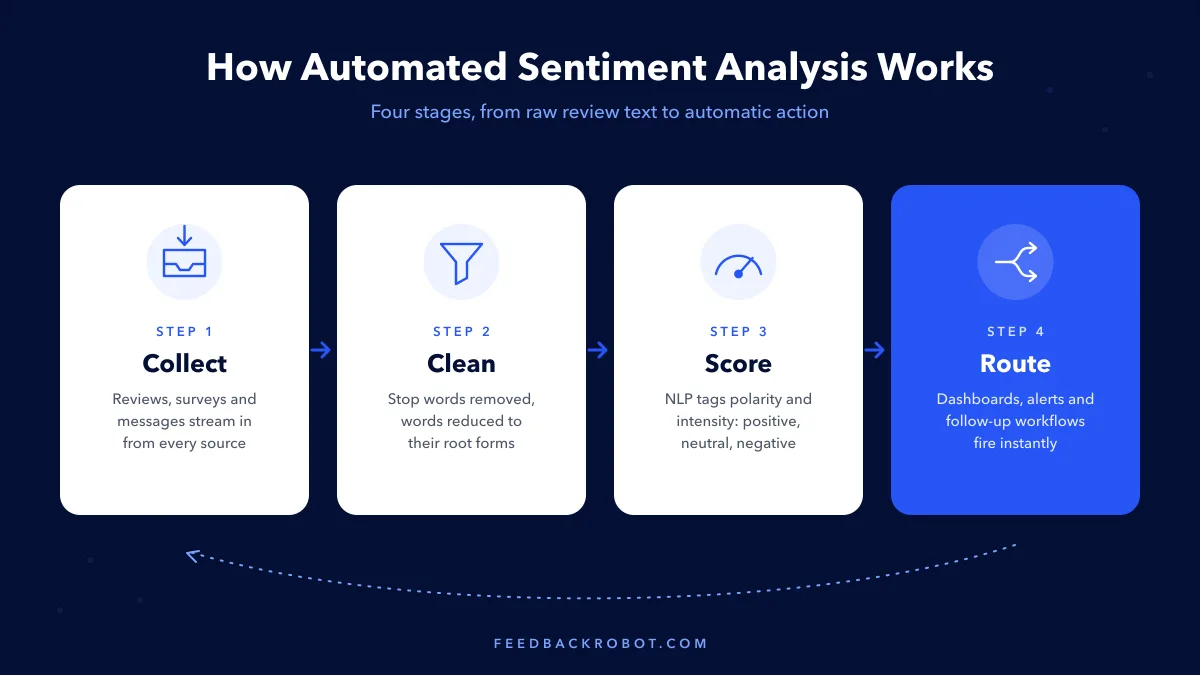
Every automated sentiment analysis pipeline — whatever the vendor — runs the same four stages: collect the text, clean it, score it, and route the resulting signals somewhere useful. Here’s what each stage does.
1. Collect Reviews and Feedback
Scoring starts with a steady feed of text: reviews, survey responses, and messages pulled in automatically rather than uploaded by hand.
Integration with Mews and Toast syncs reviews directly into Radar, no manual uploads required.
Real-time alerts deliver critical sentiment score updates via Slack or email, so nothing slips through the cracks.
The era of simply identifying sentiment is over; nearly every tool now offers basic scores. The real challenge for businesses in 2026 isn't just knowing what customers feel, but predicting the downstream impact and automating precise, timely actions to either recover or amplify those experiences. Many organizations are still caught in the trap of dashboard-driven analysis without operationalizing insights, missing crucial opportunities for customer retention and reputation management.
2. Clean and Normalize the Text
Removing stop words is like tossing out stems and peels—you only keep what adds real flavor.
Meanwhile, stemming and lemmatization are your knife skills. They trim words back to a common base so “apples” and “apple pie” share the same root.
Stop Word Removal filters out filler words that carry little meaning.
Stemming and Lemmatization reduce words to their root form, ensuring consistent scoring across variants.
3. Score Polarity and Intensity
Polarity sorts feedback into three clear buckets—positive, neutral, or negative—much like a simple thumbs-up/thumbs-down system.
At the same time, intensity measures how strongly that vote is cast. Is it a gentle nod of approval, or a full-blown complaint?
Positive example: “The lobby felt warm and welcoming” registers a mild positive sentiment.
Strong negative example: “The meal was absolutely awful” sits at the opposite extreme.
Neutral example: “The water temperature was set to 70°F” falls squarely in the middle.
“Context is key – ‘light’ can praise ambiance or flag low energy.”
These layers add nuance to raw numbers and set you up to track sentiment shifts with confidence.
4. Route Signals to Dashboards and Actions
After scoring, different engines stream insights into your central hub:
Lexicons draw on curated word lists for quick tagging.
Emoticons catch mood from emojis or symbols.
Machine-Learned Patterns pick up on slang, sarcasm, and evolving phrases.
Then tools like Mews and Toast funnel these signals into one unified feed. When sentiment dips, Prompt to Survey can automatically trigger a follow-up so no low-scoring review slips through the cracks.
An ensemble approach—combining multiple signals—helps close blind spots around sarcasm or niche jargon.
Real-time feeds let you spot sudden trend spikes or seasonal swings at a glance. With everyone speaking the same analytics language, you’ll breeze through accuracy metrics later on.
Building A Strong Foundation
Grasping these core concepts puts you in a position to pick the right sentiment engine. With clear analogies and practical examples, you’re set to evaluate accuracy, tackle tricky cases, and explore automated recovery workflows in the next section.
Automated Sentiment Analysis Methods Compared

Sorting through reviews can feel like choosing the right lens for your camera. Each sentiment engine brings its own focus, speed, and depth. Below, we unpack four core approaches with analogies to help you decide which one fits your feedback toolkit.
Method Analogies
Lexicon-Based
Think of this as a trusty dictionary. It matches words against a pre-defined list of positive and negative terms. Setup is a breeze, and it flies through thousands of reviews in seconds.Classical Machine Learning
Picture coaching a barista with example orders. You feed the model labeled reviews, and it learns to serve up predictions on new text. It strikes a balance between speed and tailored accuracy.Transformer-Based Deep Learning
Imagine teaching a robot to read the room. Models like BERT grasp context, sarcasm, and subtle tones. They shine when feedback is messy or loaded with nuance.Aspect-Based
Use this like a magnifying glass on specific topics. It dives into sentiment around defined entities—maybe “customer service” or “battery life.” The result is targeted insights on the features that matter most.
“Sometimes a simple lexicon model outperforms heavier AI on focused domains.”
Comparison Of Sentiment Analysis Methods
Method | How It Works | Pros | Cons |
|---|---|---|---|
Lexicon-Based | Tags words against positive/negative lists | Fast setup, low compute, transparent rules | Misses context, struggles with slang |
Classical Machine Learning | Learns from labeled reviews using statistical algorithms | Balanced accuracy, adaptable, efficient | Requires labeled data, initial training time |
Transformer-Based Deep Learning | Builds contextual embeddings for full-sentence understanding | High accuracy, captures nuance, handles sarcasm | Resource-intensive, higher latency |
Aspect-Based | Focuses sentiment analysis on specified entities or features | Feature-level insights, reveals targeted feedback | Complex pipeline, more preprocessing |
Choosing The Right Engine
Your ideal pick hinges on review volume and the type of insight you need. For high-volume hospitality streams, a lexicon model keeps pace without breaking a sweat. Multi-location service brands often start with classical ML, since they can supply an initial labeled set. Boutique sellers or tech products lean on transformer-based models to catch subtle context and tone.
Speed Priority: Lexicon-Based or Classical ML
Nuance Critical: Transformer-Based
Feature Focus: Aspect-Based
Learn more about customer feedback analysis tools in our article on comprehensive feedback analytics.
Making The Decision
Map your monthly review volume and feedback complexity
Check compute resources and data-labeling capacity
Run a pilot on a sample of real reviews
Compare speed, accuracy, and ease of integration
A short test with each engine is the fastest way to see which aligns with your goals. Armed with clear trade-offs and real-world analogies, you’ll pick the right tool for your feedback pipeline.
Integration Tips
Integrate sentiment engines via API or webhooks to keep data flowing smoothly.
Combine models in an ensemble to cover blind spots
Schedule regular retraining to keep up with evolving language
Use lightweight lexicon checks as a first pass to catch spikes early
Automated triggers shaved 30% off service recovery time across 50 stores.
Testing on a 1,000-review dataset took 5 minutes with lexicon-based methods and 30 minutes for a transformer model. Accuracy ranged from 70% with simple word lists to 88% using BERT. Use these benchmarks to set realistic performance goals.
Measuring Accuracy And Evaluating Models

Think of your sentiment model as the engine behind every review insight. If it falters, you end up drawing the wrong conclusions—no matter how sleek your dashboard looks.
A lone percentage can be misleading. It’s only by unpacking that number that you truly understand performance.
These days, well-tuned sentiment pipelines clear 90% accuracy regularly, closing the gap between machine and human judgment and letting you sift through millions of reviews at scale. For deeper stats, check out this report on sentiment analysis accuracy in marketing.
Here Are The Core Metrics To Track:
Precision: Of all the items our model flags, how many are actually positive or negative?
Recall: Out of every true sentiment instance, how many did the model catch?
F1 Score: A single number that balances precision with recall.
Confusion Matrix: A grid showing true positives, false positives, true negatives, and false negatives—perfect for hunting down specific error types.
Precision and recall help you see if your model is over–sensitive or missing too much. The F1 Score then consolidates those checks into one digestible figure. And when you need a visual cue, a confusion matrix pinpoints exactly where the model stumbles.
Handling Language Nuances
Sarcasm slips through like a hidden trapdoor. Idioms and slang only make it trickier.
Introduce rule–based overrides to snatch common sarcastic patterns before they slip past.
Fine–tune on domain–specific phrases—whether guests say “five stars” or “five alarms” in a restaurant review.
“Ongoing evaluation is your best defense against drift and nuance.”
Validating And Monitoring Drift
Language evolves. What made sense last month might confuse your model today.
Follow this simple pipeline:
Manually label a representative batch of real reviews.
Run your model against that set and log the metrics.
Retrain or tweak your rules once any metric dips below your threshold.
By monitoring drift continuously, you prevent small shifts in phrasing from snowballing into big accuracy losses.
Blending Rules With AI
Think of rules as landmarks on a map and AI as the GPS handling the winding roads.
Rule engines catch edge cases—emoji–heavy comments, odd vendor names, or repeated product terms.
AI models interpret nuance and context that static rules can’t.
In FeedbackRobot, this blend runs inside Radar, which merges rule-based and AI signals into one view and routes low-sentiment reviews into follow-up workflows automatically.
This hybrid strategy means you collect smarter feedback, act on insights faster, and build a stronger operation every day.
Best Practices For Model Evaluation
Split data into distinct training, validation, and test sets to keep bias at bay.
Use confusion matrices to isolate and tackle specific error types.
Schedule a full re-evaluation after any major feature rollout.
Track drift by comparing fresh data batches back to your benchmark.
Layer in human reviews for those odd edge cases and continuous learning.
With a routine evaluation rhythm, you stay ahead of surprises rather than scrambling to react.
Tracking KPIs Over Time
Set clear targets for precision, recall, and F1 improvement each quarter. Watch how your confusion matrix shifts after every model tweak.
Compare weekly precision and recall charts to catch sudden jumps.
Chart monthly F1 trends so you see performance dips early.
Track false positive rates to avoid unnecessary service escalations.
Embed these metrics into your monitoring dashboards and set alerts to ping whenever anomalies pop up. Define drift thresholds that automatically trigger retraining before performance craters.
When you weave evaluation into daily workflows—complete with automated alerts and real–time summaries—your team stays aligned, proactive, and ready to refine the engine at the first sign of wear.
Daily, ongoing evaluation powers continuous improvement across every corner of your operation.
Putting Automated Sentiment Analysis to Work in FeedbackRobot
Turning raw feedback into real action means weaving sentiment analysis into your daily operations. Think of it like a weather vane for your service: it points you to emerging storms before they hit.
Here’s how to fire up Prompt to Survey (follow-up survey automation) for targeted follow-ups, let the Resolutions Engine (automated service recovery) kick off recovery steps, and surface unified trends in Radar (unified review intelligence). You’ll also see how to hook into high-intent partners like Mews or Toast via API, set up real-time alerts for negative sentiment, and lock down privacy and compliance.
A clear comparison table follows so you can choose the best setup time and core features for your platform.
Connecting Platforms Via API
Integrations begin by matching a connector to your existing tech stack. For example, Mews and Toast offer ready-made APIs that funnel guest comments straight into Radar. That seamless pipeline removes manual entry and accelerates your response rhythm.
You can also spin up a custom API endpoint to capture feedback from niche apps or homegrown systems.
Trigger follow-ups with Prompt to Survey when sentiment dips below your threshold. This captures fresh context before guests move on.
Set Resolutions Engine rules to launch recovery messages or discount codes any time negative sentiment pops up.
Roll all feedback into Radar dashboards so your team scans cross-platform sentiment at a glance.
Plug in Slack or email notifications to flag when negative sentiment tops 10% of daily mentions for instant triage.
These automations help you move fast and keep manual checks to a minimum. For instance, a hotel group slashed response times by 40% using these triggers.
Compliance And Privacy
Safeguarding guest trust means handling data with care. Always anonymize personal details and use encrypted channels for all API calls to stay GDPR-ready. Build retention rules to purge older reviews once they fall outside your compliance window. And rely on Radar’s audit logs to track every API call and action.
Key Integration Options For Sentiment Analysis
Integration | Platform | Setup Time | Core Features |
|---|---|---|---|
Mews | Hospitality PMS | 10 minutes | Real-time review sync, reservation context, rating metadata |
Toast | Restaurant POS | 15 minutes | Guest feedback capture, menu item tagging, on-premise alerts |
Salesforce | CRM | 30 minutes | Unified customer profiles, case creation triggers, sentiment score fields |
Custom API Endpoint | Any | Variable | Fully customizable data flow, selective fields, bi-directional sync |
Pick the connector that aligns with your team’s skills and urgency to get up and running without friction. For deeper technical tips, see our AI feedback analysis tool. Aligning on the right connector means faster deployment and rock-solid data reliability.
Next Steps And KPIs
Once your integrations are live, keep an eye on key signals in Radar. Track trigger rates, average resolution time, and follow-up survey completion rates. Aim for a 20% boost in follow-ups and a 30% drop in negative sentiment spikes as your first milestones.
Use these KPIs to fine-tune workflows and coach your team. Embed automated alerts and AI Summaries (instant insights & sentiment analysis) so no trend slips through the cracks. This process ensures smarter feedback, speedier actions, and stronger operations.
Real-World Workflow Example
A regional restaurant group used Prompt to Survey triggers to cut manual outreach by 70%. When sentiment fell below the threshold, the Resolutions Engine sent coupons within minutes. Meanwhile, Radar charts steered kitchen staffing on busy nights.
“Automated workflows turned reactive service into proactive recovery across 120 locations.”
In just three months, negative reviews fell by 25% thanks to this feedback pipeline.
Best Practices To Maintain Integrations
Review API logs every month to catch errors or slowdowns.
Adjust sentiment thresholds in line with seasonal trends.
Refresh Prompt to Survey questions quarterly for new context.
Test Resolutions Engine triggers after any major process update.
Routine check-ins help ensure Radar dashboards mirror genuine sentiment. Train your team on reading AI Summaries so data always drives decisions. FeedbackRobot’s unified platform gives you smarter feedback, faster actions, and better growth every day.
Real World Use Cases
Many hospitality and service brands now depend on automated sentiment analysis to uncover hidden opportunities.
Below are three real stories—a boutique hotel chain, a restaurant group, and an online retailer—that you can adapt to your own business.
Each example outlines clear steps to improve service, so busy leaders can follow proven tactics without guessing.
Boutique Hotel Chain uses real-time mood scores to reallocate staff.
Restaurant Group catches menu complaints within hours.
Online Retailer drives repeat purchases with sentiment-driven outreach.
Boutique Hotel Chain
This boutique hotel chain gathers guest comments from TripAdvisor, Google Reviews, and in-house surveys.
They feed everything into Radar, which presents a live mood score on one central dashboard.
Managers watch for any dip below their preset threshold and shift staff where they’re needed most.
Next, AI Summaries sift through hundreds of comments to reveal top pain points—like slow check-ins.
When a dip triggers a Prompt to Survey, the front desk launches quick second surveys to dig deeper before small issues become big problems.
Meanwhile, the Resolutions Engine swoops in with apology messages and room upgrades whenever negative sentiments spike.
Now, staff review a live mood dashboard at every shift handover, keeping everyone on the same page.
In just one month, reassigning team members this way cut response times by 20% and boosted guest satisfaction by 15%.
“Real-time mood scores helped this hotel slash negative feedback resolution time by 40%.”
Radar alerted managers to lobby crowding in time to open a pop-up bar.
Quick staff reassignments kept service seamless during peak check-ins.
Restaurant Group Workflow
A mid-sized restaurant chain taps automated sentiment analysis to fine-tune its menu.
Customer comments from social channels and POS terminals flow into Radar, showing chefs rising mentions of undercooked dishes within hours.
With AI Summaries, the team spots that spicy items have polarizing reviews—and they tweak recipes on the fly.
Each trigger launches a Prompt to Survey that asks guests about spice levels in real time.
New responses feed back into Radar, so managers track trends across all locations.
Then, the Resolutions Engine automatically sends discount codes to any diner who had a poor experience.
This loop cut negative resolution time by 35% and lifted overall satisfaction by 12%.
“Rapid follow-ups turned guest complaints into recipe improvements across 20 locations.”
Online Retailer Engagement
An online retailer applies automated sentiment analysis on product reviews to spark repeat buys.
They segment customers in Radar by sentiment score and purchase history.
Then AI Summaries surface themes like slow shipping or packaging issues that deserve attention.
At the same time, the sentiment analytics software market is projected to grow from USD 3 billion in 2025 to USD 5.83 billion by 2029 as companies adopt automated sentiment analysis on reviews to reduce negative feedback resolution time by up to 40% and improve satisfaction. Discover more insights about market growth on Technavio.
Next, Prompt to Survey reaches out individually to customers whose rating falls below the target.
Finally, the Resolutions Engine takes over—offering free returns or product upgrades automatically.
Use Case | Resolution Time Reduction | Satisfaction Lift |
|---|---|---|
Hotel Chain | 40% | 15% |
Restaurant Group | 35% | 12% |
Online Retailer | 30% | 20% |
“Sentiment-driven outreach lifted repeat purchases by 20% and cut churn by 10%.”
Key Takeaways From Real Cases
Align sentiment thresholds with staffing levels to close service gaps.
Automate follow-ups with Prompt to Survey to get context in the moment.
Review Radar charts weekly to guide your operations huddle.
Let AI Summaries call out urgent themes before they spiral.
Use Resolutions Engine workflows to recover unhappy customers instantly.
Implementation Tips
Pilot the workflow in one location to dial in thresholds and actions.
Train frontline teams to read Radar alerts and respond quickly.
Tune your sentiment triggers each month based on seasonal feedback.
These cases show how to collect smarter feedback, act faster on insights, and grow stronger outcomes.
Ready to put your reviews to work? Start your free trial of FeedbackRobot today to deploy Radar, AI Summaries, Prompt to Survey, and Resolutions Engine instantly. Or launch our Spotlight Feedback Wall to showcase live customer sentiments and amplify social proof.
Collect smarter, act faster, and grow stronger with FeedbackRobot’s Feedback Operating System.
Frequently Asked Questions
What Is Automatic Sentiment Analysis For Reviews And Why Is It Vital?
Automatic sentiment analysis is like getting a real-time mood read on every review. It scans comments and tags each as positive, neutral, or negative, so you catch emerging trends without slogging through thousands of messages.
Processes vast volumes of feedback without extra hires
Flags sentiment spikes the moment they occur
Triggers proactive outreach to address concerns
This level of clarity lets you tackle problems before they snowball.
How Accurate Are Sentiment Analysis Models And How Do I Track Performance?
Today’s sentiment models often reach about 90% accuracy on well-labeled datasets. But numbers only tell part of the story. Keep an eye on precision, recall, and the F1 score, and use confusion matrices to understand where the model trips up.
“Ongoing evaluation with precision and recall is your best defense against model drift.”
Visualize misclassifications with a confusion matrix
Regularly compare AI labels against human annotations
Surface key metrics on live dashboards
By spotlighting these figures, you’ll spot drift before it impacts your insights.
Integrations And Workflows
Plug your reviews directly into Radar via APIs or connectors for tools like Mews and Toast. Then add Prompt to Survey (follow-up survey automation) for follow-up questions and the Resolutions Engine (automated service recovery) to automate responses when sentiment dips.
Route Mews/Toast feedback into Radar dashboards
Trigger Prompt to Survey on low-sentiment reviews
Configure Resolutions Engine to send apology messages or discount codes
Push alerts to Slack or email in real time
Highlight patterns in AI Summaries
No more manual imports—just live, actionable data.
What Data Privacy Steps Should I Follow?
Data privacy builds trust. Always anonymize personal details before analysis and enforce HTTPS/TLS for every API call. Keep your privacy policy crystal clear about how review text gets processed.
Encrypt data at rest and in transit
Review audit logs periodically for compliance
Update policies when you onboard new data sources
Regular privacy checks protect both your business and your customers.
Next Steps Checklist
Label a sample review set to benchmark your model.
Connect your platform to Radar for unified review intelligence.
Activate AI Summaries for instant sentiment insights.
Define Resolutions Engine triggers for negative feedback.
Schedule quarterly sentiment audits
Train your team to respond to trend alerts
Follow this roadmap to launch—and refine—your sentiment analysis strategy.
Put sentiment insights to work: when the analysis flags a negative review, draft an empathetic reply in seconds with our free AI review response generators.
How does automatic sentiment analysis actually work?
The software uses Natural Language Processing (NLP) to read the text of a review, categorizing it as positive, negative, or neutral. It then identifies specific 'entities' like 'pricing' or 'service' to tell you *what* triggered that emotion.
Can the AI understand sarcasm in a review?
Modern sentiment engines are trained on millions of sentences and are increasingly good at identifying tone. While not 100% perfect, they significantly outperform manual reading for identifying overall trends.
Why is 'Automatic' analysis better than a manager reading every review?
Speed and objectivity. A manager might miss a trend because they have a 'busy day,' but an AI never sleeps. It can alert you to a sudden spike in negative sentiment (like a kitchen issue) within seconds.
Can I see sentiment trends over time?
Yes. Automatic analysis plots your sentiment on a graph. This allows you to see if your recent staff training or menu change actually improved how people *feel* about your business.
Does it work for short reviews like 'Good food'?
Yes. Even two-word reviews contribute to your 'Sentiment Score.' The AI aggregates these thousands of small data points to give you a highly accurate 'Pulse' of your reputation.
Put this on autopilot
Sentiment Analysis for Feedback
A ready-made FeedbackRobot automation that runs this for you — deploys free in under 5 minutes.
Stop reading about it. Let your agent handle it.
25 free AI actions · no credit card required
Start Free